

運用BusyBox技巧將AI提示轉換為原生可執行檔
本文探討一種利用BusyBox技巧,使AI提示模板能像原生命令行可執行檔一樣運作的方法,讓使用者能直接執行如「總結」等提示,而非依賴中間工具。

GenAI Prompts as "Native" Programs
Templated prompts are quite practical. These are prompts with placeholders for
user arguments, which enable re-usability and helps prevent duplicating prompts
for only minor differences.
For example, a "summarize" template may look something like the following:
During execution of the above, a user dynamically populates the
placeholders {{words}} and {{text}}.
Lately I've seen several projects for executing such "templated" prompts. For
example, the popular simonw/llm tool enables
you to create and execute a template like the above (with slightly different
syntax) as follows:
You execute llm, having it recall the template with -t TEMPLATE_NAME
argument, and pass key-value parameters via repeated -p arguments, as well as
stdin.
Another tool is chr15m/runprompt. What I
like about this one is that it uses a more expressive templating syntax:
Dotprompt.
(My) Problem
Generally all such tools that I have found offer usage along the lines of:
This "format" does not exactly fit my "taste" for how a command line program
should look like. I mean the name of a prompt template (e.g., "summarize") is
inherently indicative of the action that should take place. So why can't I just
execute summarize instead of having to tell another program to interpret a
summarize template?
In fact, runprompt tries to handle this usage scenario by allowing a shebang
line #!/usr/bin/env runprompt at the top of the template and executing the
prompt file "directly":
I do like this setup, but still:
The BusyBox Trick
BusyBox is a single executable that
combines many common Unix utilities (like ls, cp, grep, etc.) into one small
program. It uses a clever trick: it checks what name it was called with and
then runs the corresponding utility's code. When you create symbolic links
named ls, cp, grep, etc. that all point to the single BusyBox executable,
BusyBox looks at argv[0] (the program name) to figure out which utility you
want. So when you run ls, BusyBox sees it was invoked as "ls" and executes
its internal ls code.
I figured one could use the same trick like BusyBox: Symlink a prompt name like
summarize (or summarize.exe on Windows) to one main binary. Executing the
link automatically transmits the prompt name to the binary, which can look
up a corresponding configuration by name (summarize.prompt) in a known
configuration directory.
So with that we can do something like:
Next step is to improve user input (arguments).
Dotprompt Files
Dotprompt is specification created by Google for describing executable prompt
templates.
A Dotprompt file contains YAML frontmatter for configuration, and Handlebars
templates for dynamic prompt content generation. Thus, we can describe our
summarize prompt in Dotprompt as follows:
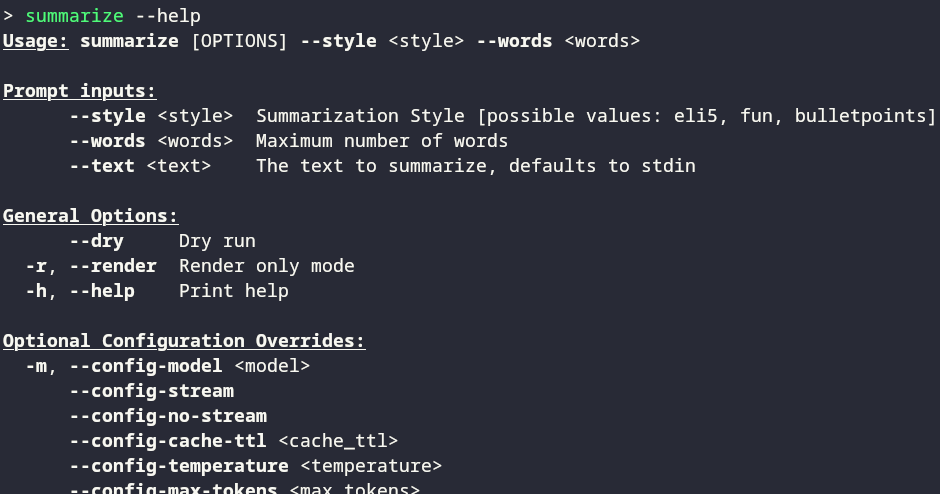
Since we have input schema, our binary can parse it every time it is invoked
via the symlink summarize, dynamically generating and parsing arguments in an
all familiar way:
Because the templating system uses handlebars, it is quite powerful. A more
involved expansion of the above may look like:
which results in:
The above was the starting point for why I built
promptcmd.Then things escalated and suddenly there is
load balancing,
caching, other neat
features :).
Check out the repo, installation &
documentation, and
examples.
相關文章