

利用 Git Submodules 實現 AI / LLM 代理指令的集中化方法
這篇文章介紹了一種利用 Git Submodules 在多個專案中組織 AI/LLM 代理指令的結構化方法。它詳細說明瞭如何為 AI 配置創建單一真相來源,從而實現理解專案特定約定和工作流程的專業化 AI 助手。
A Centralised Approach to AI / LLM Agent Instruction Using Git Submodules
21 Jan 2026
A guide to organising and replicating instructions for AI / LLM coding assistants
Introduction
As AI coding assistants have become increasingly capable, I've developed a structured approach to integrating them into my development workflow. This post details how I've organised my codebase to work effectively with multiple AI agents - GitHub Copilot, Claude and others, while maintaining a single source of truth for instructions across multiple projects that share a similar tech stack and structure.
Key to this approach is the use of Git submodules. This allows me to maintain a single repository with my core AI instruction and agent skill files, which is then referenced by each product repository, ensuring the same instructions are available across all projects.
By investing time in structured documentation, I've transformed my AI assistants from general-purpose tools into specialised team members who understand my codebase, conventions, and workflows.
The Architecture: A Git Submodule Approach
At the core of my setup is a git submodule called .ai-instructions/ that contains all AI-related configuration. This approach offers several advantages:
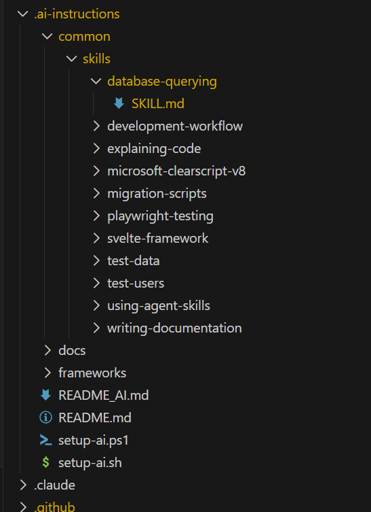
VSCode Tree View of Git Submodule File Structure
Entry Points: Agent-Specific Boot Files
Different AI tools look for instructions in different places. I use thin "pointer" files at the repository root:
CLAUDE.md (for Claude Code)
.github/copilot-instructions.md (for GitHub Copilot)
AGENT.md (for other agents)
This pattern ensures that regardless of which AI tool I'm using, they all receive the same foundational instructions.
The Master Document: README_AI.md
README_AI.md is a comprehensive, LLM agnostic document that establishes context, conventions, and expectations. I limit the content in this document to instruction that has a good chance of being relevant to any task. The structure is:
1. Confirmation Protocol
This simple requirement ensures the AI has actually processed the instructions before diving into tasks.
2. Role Definition
The document begins by establishing the AI's role and capabilities:
You are a master software engineer, an expert in all areas of the Software Development Life Cycle (SDLC). This includes but is not limited to UI design, DevOps, SecOps, software architecture, application development, unit testing, and design patterns.
3. Technology Stack
A clear overview of the project's technologies:
4. Code Style Guidelines
Detailed conventions for each language and framework, e.g:
5. Behavioural Rules
Critical instructions about what the AI should and shouldn't do, e.g:
The Agent Skills System
One of the most powerful aspects of my setup is a set of agent skills (a standardised approach for providing instruction to LLMs that will be used when the title / description indicates that it should be used for the task at hand). These are domain-specific knowledge modules that guide AI agents through common tasks.
How Skills Work
Skills are markdown files with a specific structure:
The frontmatter provides metadata that allows AI agents to:
My Current Skills
Skill Distribution
The setup script copies skills from the submodule to agent-specific locations:
This ensures both Claude and GitHub Copilot discover the same skills:
setup-ai.ps1
The distribution scripts are as follows:
setup-ai.sh
Skill Announcement Protocol
To maintain transparency, agents must announce when they're using a skill:
Framework Documentation Integration
For complex frameworks, I include full documentation within the submodule. Many frameworks have now published documentation targeted at LLMs. For example:
This file contains the complete Svelte 5 documentation in a format optimised for LLM consumption. When an agent needs framework-specific guidance, it can read this file directly rather than relying on potentially outdated training data.
VS Code Integration
MCP Server Configuration
For GitHub Copilot, I configure Model Context Protocol (MCP) servers in .vscode/mcp.json. These can similarly be centralised and distributed via scripts:
This gives the AI access to browser automation tools for E2E testing.
DBCODE for Database Access
The database-querying skill leverages the DBCODE VS Code extension, providing read-only database access:
Practical Examples
Example 1: Creating a Database Migration
When I ask: "Add a new column to track user preferences"
The AI:
Example 2: E2E Testing
When I ask: "Test the login flow"
The AI:
Example 3: Adding a Feature
When I ask: "Add a budget tracking component"
The AI:
The Benefits of a Centralised Approach
1. Consistency
Every AI interaction follows the same conventions. Whether it's Claude, Copilot, or another tool, the code quality and style remain consistent.
2. Reduced Repetition
Instead of explaining my conventions in every prompt, the AI already knows them. My prompts can focus on what I want, not how to do it.
3. Fewer Hallucinations
By providing comprehensive context, the AI makes fewer assumptions and speculates less. The instruction to "Never speculate about code in files you have not opened and read" is remarkably effective.
4. Onboarding New Projects
When starting a new project, I simply add the submodule and run the setup script. Instant AI integration with all my established patterns.
5. Transparent Skill Usage
The skill announcement protocol keeps me informed about which specialised knowledge the AI is applying, making it easier to verify its approach.
6. Greater Agent Autonomy
Less intervention is required to have an agent complete a task and produce code that satisfies the requirement and behaves correctly.
Setting Up Your Own System
Step 1: Create the Instructions Repository
Create a git repository with your AI instructions:
Step 2: Structure Your Documents
Create the essential files:
Step 3: Add as Submodule
In your projects:
Step 4: Create Entry Points
Add the thin pointer files (CLAUDE.md, AGENT.md, .github/copilot-instructions.md) pointing to your main instructions.
Step 5: Run Setup
Conclusion
Effective AI-assisted development isn't just about having access to capable models- it's about giving them the context they need to be genuinely helpful and autonomous. By investing in structured documentation, a skills system, and a consistent setup across projects, I've transformed my AI assistants into reliable collaborators.
The git submodule approach ensures these improvements compound over time. Every refinement to my instructions benefits all my projects immediately. Every new skill I create becomes available everywhere.
If you're using AI coding assistants regularly, I'd encourage you to develop your own structured, repeatable approach. The upfront investment pays dividends in every subsequent interaction.
Stay Updated
Subscribe to the mailing list to receive the latest blog posts and updates directly in your inbox.
Please correct the following errors:
We respect your privacy. Unsubscribe at any time.
Comments
No comments yet. Be the first to comment!
Please sign in to leave a comment.
相關文章