

AI 聽寫工具大戰
本文評測並比較了四款頂級的 AI 聽寫(語音轉文字)工具,作者基於其特定工作流程,特別是在密集學習法語的背景下,評估了它們的表現。


The Battle of the AI Scribes ⚔️
Dive Into Four Top-Tier AI Dictation Tools!

Besides LLMs, I’ve been using AI dictation (speech-to-text) tools frequently lately. Most people use them for meetings, note-taking, writing emails, and more, but I use them for a specific purpose. In this article, I evaluate and compare four AI dictation tools based on my workflow to see which one performs best. 🏆
On Speech-to-Text Tools
I've been on Duolingo studying French for 5 years, but even after that, I wasn't yet happy with my progress. So, I have been studying it more intensively on my own over the past few months, and it has been life-changing because I am not only learning the language more, but also gaining insight into French culture and behavior.
Thanks for reading Fernsology! Subscribe for free to receive new posts and support my work.
During this journey, some tools have been helpful, and I would say that speech-to-text tools have been invaluable, especially for speaking. I wanted a tool that recorded me in real time so I could see that I was pronouncing it correctly, and I could give that text to a French speaker or an LLM to correct my grammar. It made me so productive, and I have achieved so much that I am now at a specific CEFR level in French — B1/low B2, already approaching a steady B2 — such an outstanding achievement!
Inspired by these experiences, I decided to write this article to evaluate four speech-to-text tools I encountered on my journey, highlighting which one stood out the most and which I used primarily. Enjoy!
Wispr Flow is a speech-to-text AI tool designed to make device interaction as easy as talking to a friend. According to the founder, in 2008, when the first Iron Man movie was released, he was inspired and wanted to create Jarvis. Then, he and his friend decided to create what he considered one of the very first voice assistants, before Alexa appeared. He recalled attending a party where people openly praised the assistant's coolness. That experience actually inspires the mission behind Wispr Flow: to build technology that is highly useful for people and sparks joy in every interaction.
I would have to say that trying Wispr Flow for the first time is very intuitive. All you need to do is go to the website, then download. Before you download, you will be required to sign up. After downloading, install and enable it on your computer by following the instructions.
As you get onboarded, the desktop app lets you personalize your settings, including your personal messages (formal, casual, very casual) and work or email messages, as well as other apps (formal, casual, excited).
It also shows you how to use the Function Command Key fn to start dictation, and you can use it right away. In the desktop app, you can see all your transcripts in one place. Alternatively, you can go into any space or app where you'd like to take notes and use the fn key to do so! You can press the fn key for short dictation and fn + the space bar for long dictation.
This product is not only well-designed, well-engineered, and intuitive; it also delivers strong performance, enabling high productivity. Here are some other great features of Wispr flow:
Wispr Flow offers universal compatibility and works smoothly across Windows, macOS, and iOS. It features context awareness, which adjusts based on the app you're using, so whether you're writing an email or a standard message, it tailors its output accordingly.
For privacy and security, if you enable privacy mode in the settings, data will not be stored on servers. Wispr Flow is SOC 2 Type II certified, indicating that its security, availability, and privacy practices have been independently audited to meet strict industry standards, and is HIPAA compliant, making it suitable for regulated industries such as healthcare.
Audio can quickly be converted to text with high accuracy across over 100 languages. It’s concise, removes filler words, accurately captures names, and has a 97.2% transcription accuracy. It also provides 4 times faster results than typing.
Hands-free editing and formatting are enabled through Flow’s Command Mode, further improving efficiency and ease of use.
This interesting tool includes a personal dictionary that learns and adapts over time. This feature ensures that unique words and other elements are accurately transcribed.
Spokenly is another speech-to-text tool that is typically downloaded from the app store, not from the website.
After downloading and enabling microphone access and other accessibility features, use the Right Command Key ⌘ to test the voice; follow the instructions, and you should be all set. Then go to settings, choose your preferred language, select the dictation model you would like to use, and see the history of what you’ve spoken. You can press the ⌘ key for quick dictation and ⌘ + up or down arrow for extended dictation.
Besides its simple interface and quick setup, which I really love, Spokenly is designed to deliver very high speech-to-text accuracy. Here are some other great features of Spokenly:
Just like Wispr Flow, it supports over 100 languages with automatic language detection, making it great for folks who speak multiple languages or work with international teams. It also supports Mac and iPhone, but does not yet support Windows.
It also ensures privacy, but it's not just a matter of enabling it in the settings. To prevent your voice from ever leaving your computer, you can choose and activate only local models for transcription. If you select cloud models, audio is processed, immediately deleted, and never stored.
You can control your Mac with voice commands like: Search the web, launch apps, and many others.
Apart from the local models and the spokenly pro, you can also bring your own key (BYOK), which lets you use your own API key for services like OpenAI, Deepgram, or Groq for transcription.
It also supports manual punctuation control by speaking it aloud, unlike standard dictation models that detect punctuation out of context.
There is also a feature called Whisper prompting, which provides a brief hint before recording. This helps spell uncommon words, such as names and brands, and also enhances accuracy for multilingual vocabulary.
Superwhisper is another speech-to-text tool that I really like. It's interesting to see that no Wi-Fi is needed, as everything runs on your device, just like Wispr Flow and Spokenly (if local models are enabled).
To download from the website, you add your email, then download and install, and you can start right away because the desktop displays what you need. It doesn’t include a walkthrough, but it’s pretty easy to navigate to find what you're looking for. To dictate, use the Option key ⌥ and the Space Bar on your computer, and you can also view the history of all transcripts.
Besides its straightforward process from download to installation and quick use, which I find great, Superwhisper is designed to offer the best ease of use while providing very high speech-to-text accuracy. Here are some other great features of Superwhisper:
Similar to Wispr Flow and Spokenly, it also supports over 100 languages and can translate all into English.
There is a feature called Modes, which intelligently adjusts how your voice is processed and selects the correct mode to transform your dictation into precisely what you need. You can choose your preferred language and pick your voice model type, whether it's local or cloud-based. You can also set your messaging, email, and other preset settings to improve dictation with smart formatting. Basically, whichever preset you choose formats it according to how it should look or be.
For context awareness, it derives this from text highlighted in the active window where you are recording, content copied to the clipboard before or during the process, or text from active input fields, names, etc., in your active window.
Users can also use their own BYOK (bring-your-own-key) API keys, just as Spokenly does.
Willow Voice is a speech-to-text tool that is 5 times faster than typing, and there is currently no Windows app, but only Mac and iOS.
According to the founder, he visited some families in China a while ago. He saw people using voice memos on the WeChat app and realized that voice is the fastest way to share a thought, while text is the quickest way to process information. He then decided with his Stanford friend to build Willow, and the first version was released in two weeks.
You download the app from the website, and as you get onboarded, the desktop app allows you to personalize your settings, including options for work messages, emails, or casual messages. Afterwards, you can set the necessary permissions, which is very straightforward. It also uses the Function Command Key (fn) to enable dictation, and you can view everything you said in the history tab of the desktop app. You can press the fn key for quick dictation and double-tap the fn key for extended dictation.
Besides its great onboarding process, simple installation, and use, here are some other cool features of Willow Voice:
Just like Wispr Flow, Willow Voice is also SOC 2 Type II certified and HIPAA compliant, making it secure and suitable for regulated industries.
It supports more than 50 languages, unlike others that support over 100.
Willow offers sub-500-millisecond processing with near-zero latency, making it extremely fast and delivering four times the productivity of typing at 150 WPM compared to 40 WPM.
The Methodology
Now we turn to the methodology I used to evaluate. To ensure a fair comparison, I assessed each tool using the following four benchmark sets.
Formatting Accuracy (French-based test) - How effectively does the tool manage punctuation, capitalization, accents, paragraph breaks, dialogue markers, and other formatting rules — especially in French, where accents and liaison-driven punctuation are essential.
Real-Time Latency - The time delay between speaking and the appearance of the written text.
Noise Robustness - How well does it perform in a noisy environment? For this test, I played music and background noise nearby to see how accurately it isolated speech.
Hotkey Simplicity & Usability - Is the hotkey easy to memorize and activate using muscle memory? Does it avoid conflicts with major app shortcuts like Cmd+C, Ctrl+S, etc.? Does it support Push-to-Talk for quick speech bursts? And does it offer Toggle Recording for long-form dictation?
Additionally, I prepared a French phrase to read aloud in both short and long versions, then compared how each tool transcribed it against the benchmark. This helped me evaluate accuracy because French differs quite a bit from English in terms of liaison, accents, gender, silent letters, and other elements. I focused on formatting, speed, and overall performance under consistent conditions.
The French note was straightforward; it echoed what I usually tell my friends: we need to protect the environment, and the government can step in to raise awareness of societal issues like transportation, pollution, and deforestation.
Here is the French note I used for my speech:
The short form:
Nous avons besoin de protéger notre environnement!
The long form:
D’habitude, je dis toujours à mes amis que nous avons besoin de protéger notre environnement. Selon moi, je crois que le gouvernement pourrait organiser des campagnes de sensibilisation pour les citoyens ou les habitants de chaque pays concernant les enjeux sociétaux comme le transport, la pollution ou le déboisement.
The short form assesses quick, natural speech bursts, while the long form evaluates continuous, extended dictation. Each tool is scored based on the following criteria:
Formatting Accuracy (Short Form) - Excellent, Good, Poor
Formatting Accuracy (Long Form) - Excellent, Good, Poor
Real-Time Latency (Short Form) - Fast, Good, Slow
Real-Time Latency (Long Form) - Fast, Good, Slow
Noise Robustness (Short Form) - Excellent, Good, Poor
Noise Robustness (Long Form) - Excellent, Good, Poor
Hotkey (Short Form) - Awesome, Cute, Meh
Hotkey (Long Form) - Amazing, Cute, Meh
The Results
Finally, I completed my analysis, which showed a nearly perfect competition among the tools; all performed very well, met high expectations, and worked effectively. I can say that the results were about 99.99% similar.
The results are shown below.
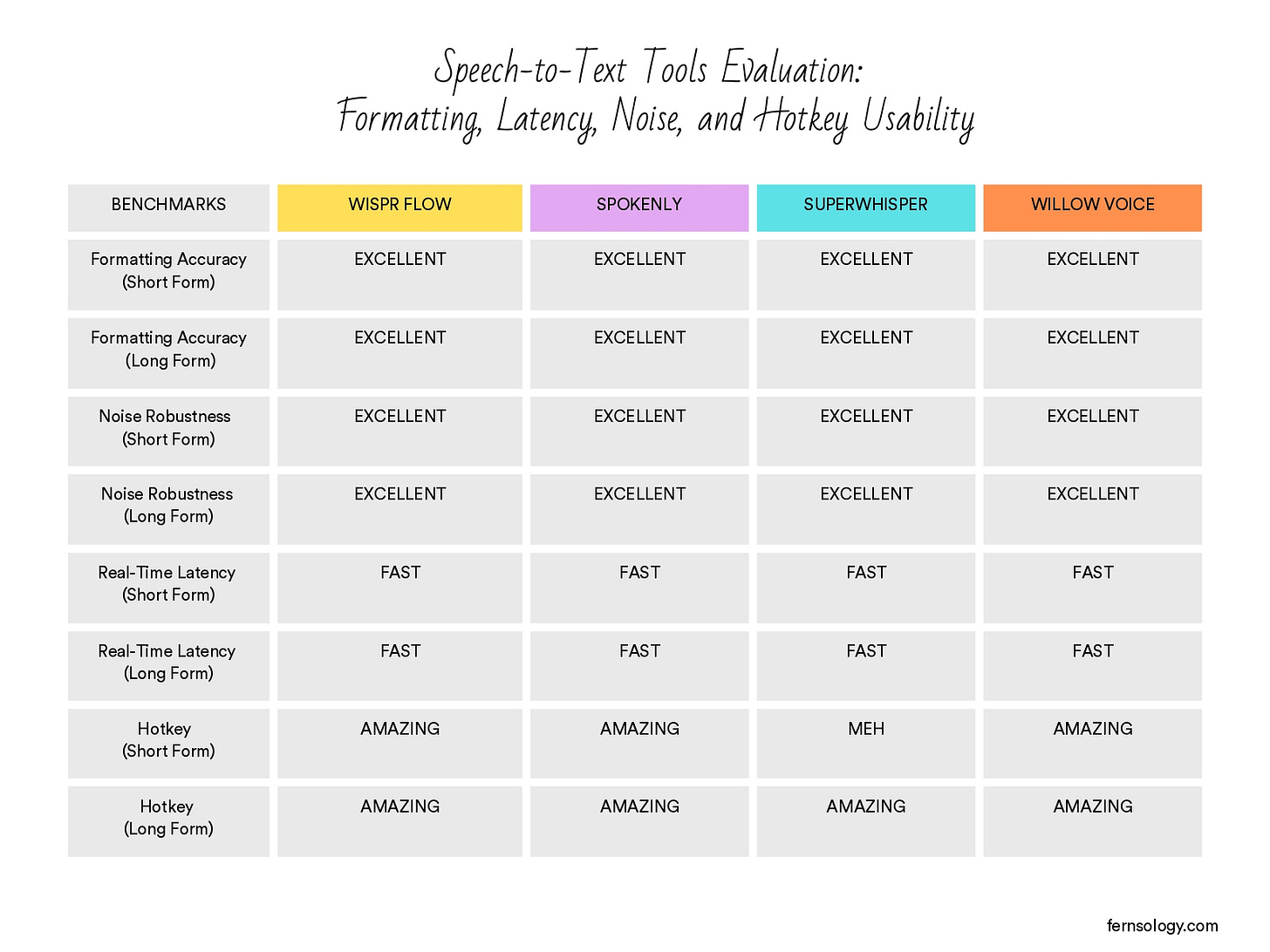
I marked “Meh” for the Hotkey (Short Form) rating on Superwhisper because ending short bursts of dictation isn’t efficient. Unlike Wispr Flow and Willow Voice, which let you press and release the Function (fn) key for quick Push-to-Talk, or Sponlely, which enables you to release the Right Command (⌘) key, Superwhisper works differently.
I had to use Option (⌥) + Space to start and the same combination to end—or manually click Stop on the screen. I checked to see if I had missed a simpler hotkey, but I couldn’t find any alternative shortcut. So, for short-form speech, the experience wasn’t as fast or smooth, which is why it received a “Meh.” I would have loved to see if I could just hit one key and that be it.
Final Winner 🏆
The final winner is Wispr Flow, which won by a narrow margin; all tools performed well and produced similar results for both short and long-form notes. However, Wispr Flow stood out especially for managing long-form content, whether with or without background noise.
These were Wispr Flow’s results:

The results for the others were the same:

Wispr Flow produced well-structured output with proper paragraph separation, unlike others, which put everything in a single block with no paragraph breaks — technically correct, but less readable and not ideal for long-form dictation. This clearer sense of structure, along with its latency, noise handling, and hotkey usability, is why Wispr Flow became the obvious choice.
Final Verdict
Yes! Wispr Flow has been my go-to tool for months now, and it has consistently delivered. I’ve made real progress—especially in my speaking and pronunciation, which matter a lot in French. At this point, Flow feels like a companion because of how much I’ve achieved with it over time, and I’ll definitely keep using it for a long while.
Thanks so much for reading. If you’d like to send me a message on ths, please visit the About page to find my contact info via LinkedIn or my personal email.
À Très Bientôt. 👋🏾
Thanks for reading Fernsology! Subscribe for free to receive new posts and support my work.
No posts
Ready for more?
相關文章