

深入解析在 VS Code 中建構 AI 程式碼編輯的四個部分
這篇文章提供了在 Visual Studio Code 中整合 AI 程式碼編輯功能的四部分深入指南,涵蓋了開發者所需的功能、增強功能和客製化選項。

Introduction
Usage
Features
Customize
Resources
Welcome to the Pochi Developer Updates — a digest of what's new in the codebase.
Here you will find highlights on features, enhancements, and bug fixes, plus insights into how we're improving the developer experience. Come back often! 👋
Weekly Update #18
TL;DR
Hope your year’s been off to a good start.
We’re back to shipping, and this release includes updates to how follow-up prompts use your local edits, a clearer Auto Layout setup flow, better recovery when things fail (like model loading and Mermaid diagrams), and a few UI fixes that remove common friction points.
Let’s dive in!
🚀 Features
User Edits are now included in agent context: Recent code changes you make are now captured and sent along with your next prompt. These edits are also shown in the chat context and multi-diff view, so you can see exactly what the agent is reacting to.
This helps the agent continue from your version of the code without you needing to re-explain what you already changed. #983
Your browser does not support the video tag.
✨ Enhancements
Create worktrees from remote branches: When creating a new worktree, you can now choose a remote branch (for example, origin/feature-branch) as the base instead of being limited to local branches. This makes it easier to start from branches that exist on the remote but aren’t checked out locally. #958
Your browser does not support the video tag.
Recover from Mermaid rendering errors in chat: When a Mermaid diagram fails to render, a Fix error with Pochi button is now shown so you can ask the agent to correct the diagram instead of being stuck with a broken block. #968
Your browser does not support the video tag.
Retry when models fail to load: If the model list fails to load due to a network or backend issue, you can now retry directly from the UI instead of reloading the entire VS Code window.#984
🔥 Preview
NES Series (Part 4): Dynamic Rendering Strategies for AI Code Edits
So far in this series, you’ve seen how we trained our NES model, what that model takes as context to make a prediction, and how these model requests are managed with correct timing under continuous typing.
With this, we’ve reached a point where NES can predict what edit should happen and when it should appear in the editor.
In Part 4, we'll talk about how there is still one critical decision to make. Once a suggestion arrives, how should that change be presented inside a live editor?
Pochi’s NES is built as a VS Code-native feature, not a standalone IDE or a custom fork. This means previews must integrate with VS Code’s public APIs, performance model, and established interaction patterns.
This introduces a core design challenge - to surface enough context for a suggestion to be actionable, without disrupting the developer's flow.
Designing a system that honors this is more than a matter of visual polish; it is a complex systems + UX problem. We’ll explore why this balance is so difficult for a native AI agent and the specific rendering strategies NES uses to achieve it.
The Display Problem
Unlike conventional editor features, NES does not control where the user’s cursor is when a suggestion arrives. The editor is a continuously changing environment and does not function like a static canvas. Sometimes the user's cursor might be exactly where the edit belongs, or it can be twenty lines away, or the suggestion itself can be a huge change spanning multiple lines.
Showing such suggestions naïvely introduces new failure modes that are easy to trigger and hard to ignore. One experiences jumps in cursor position, abrupt viewport scrolls, or rendering large changes directly in the editing flow. In practice, these behaviors are often more disruptive than not showing a suggestion at all.
This brings us to the most fundamental design question: How do we show an edit without stealing the developer’s attention?
Answering that question requires understanding the VS Code interaction model.
VS Code does not provide a built-in API for previewing LLM-generated edits. Instead, the editor offers different primitives for different kinds of locations and edits. These primitives are optimized for various interaction patterns, each with their own affordances and limitations. Some work well for cursor-local edits, while others are better suited for changes elsewhere in the file.
Understanding this difference is key. Pochi's NES does not render suggestions in a single, fixed way. Instead, NES relies on these primitives to create a balance between visibility and disruption.
Dynamic Rendering Strategy
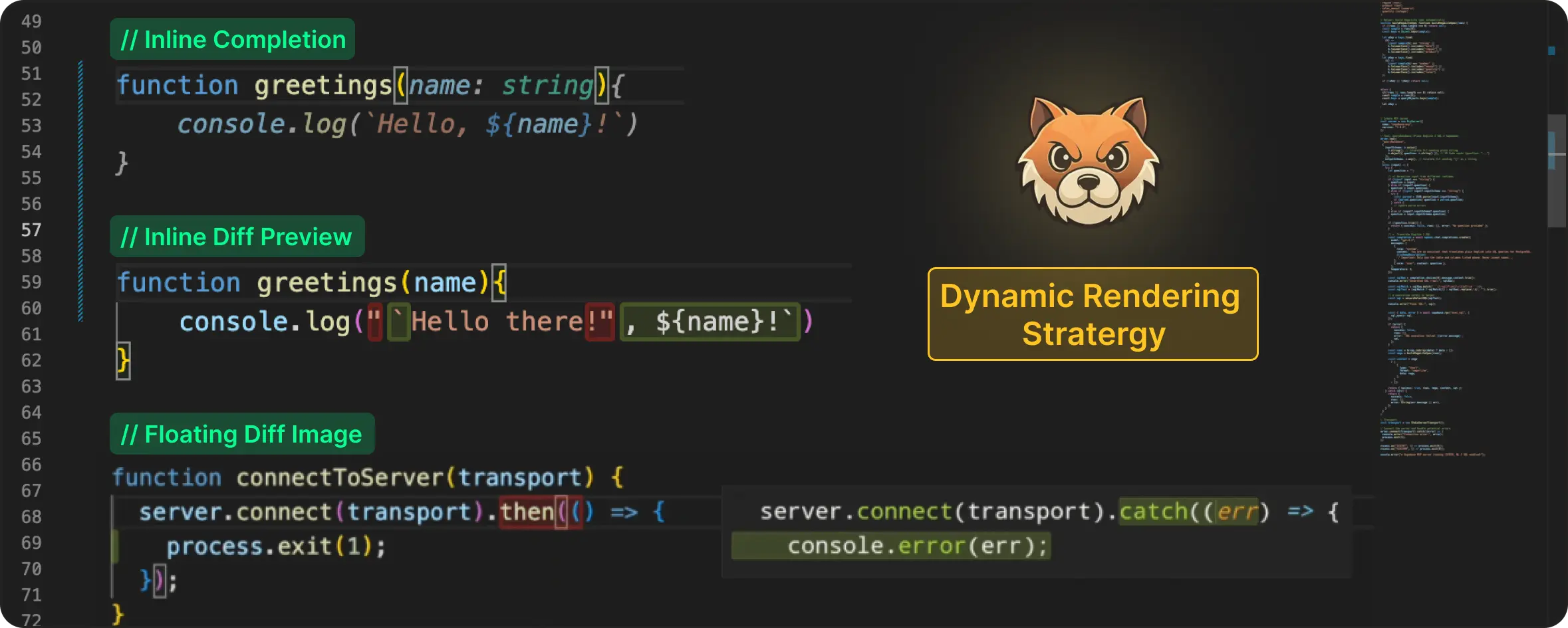
Rather than forcing all suggestions into a single representation, we designed a Dynamic Rendering Strategy offering the optimal visual experiences in different editing scenarios:
This way, each path is deliberately scoped to the situations where it performs best, aligning it with the least disruptive representation for a given edit.
Let’s take a walk-through of these rendering strategies in detail and examine when each one is used, starting with the least disruptive case.
Inline Completion

When an edit is positioned right at the cursor, the least disruptive option is to stay out of the way. In such cases, we render the edit inline, making it blend directly into the user's typing flow.
To achieve this, we use VS Code's inline completion API. This approach works especially well for small, localized changes like autoclosing brackets, replacing a few characters, or edits that are directly made under the cursor.
Inline Diff Preview
Because NES predicts the next meaningful edit across the file (not just at the cursor), many suggestions naturally apply outside the user’s current editing position. For example, while you are typing inside a function, NES may suggest updating a related import, adjusting a type definition, or fixing a reference several lines away.
In these cases, the cost of getting the presentation wrong is high. The user is forced to jump across the file, break context and interrupt their flow.
To avoid that, we render the suggestion as an inline diff decoration. The text to be replaced is highlighted in red, while the new content is shown in green at the insertion point. This way, the user gets a clear preview of the change without moving the cursor.

This works particularly well for changes involving single-line updates or even multiple lines where each line is being changed independently.
Floating Diff Image
Because NES has the ability to propose structural edits, such as inserting a new helper function, refactoring a block of logic, or adding a multi-line configuration, it frequently produces multi-line suggestions that cannot be represented as simple, inline changes.
In these cases, the suggestion is no longer tied to the cursor’s immediate context, and the standard inline rendering stratergies do not suffice.
At this point, the decision falls under either pulling the user away from where they’re working or bringing the preview to them. Since preserving developer flow is a core design principle for NES, we consistently choose the latter.
In order to make the suggestion appear near the edit target without moving the cursor, we generate a floating diff preview and render it as an image. The color schema of the suggestion will also stay consistent with the other solutions we discussed previously - red for deleted text, and green for inserted ones.
VS Code allows extensions to attach image-based decorations. With careful layout and positioning, these decorations can be floated near the edit target and used as a diff preview. However, the editor does not render code into images, which means the preview has to be generated by the extension itself.
This required a small rendering pipeline:
Theme matching: Every VS Code theme is an extension with a standard JSON format. We parse the active theme, extract its token colour map, and match it to the user’s active settings so the preview matches the theme in the editor.
Syntax highlighting: VSCode includes a bundled TextMate runtime. We load the grammar for the current filetype, generate syntax scopes, and apply the same colouring rules that VS Code uses. This ensures that the rendered code maintains the same appearance as the code in the editor.
Image rendering: Here we use canvaskit-wasm to render the tokenized code into an image. To draw the code properly, we took the editor’s current fontSize and lineHeight, drew each tokenized segment at the correct coordinates, then applied diff highlights (additions in green and removals in red). The final image is then surfaced using the decoration API.

This approach allows multi-line edit suggestions to appear near their target location while preserving cursor position and avoiding viewport jumps.
Conclusion
Different kinds of edit suggestions need different presentation strategies, with the editor API playing a decisive role in shaping the final experience.
Rendering an NES suggestion ended up being less about displaying text and more about maintaining the reader’s attention. Because no matter what, once attention is broken, even the best suggestion gets ignored.
Each rendering path is designed to stay as close as possible to the developer’s flow while working within the editor’s interaction model.
At this point in our journey, NES can decide what to suggest (the model), when to surface it (request management), and how to show it without disruption (rendering paths). Combined, these layers define how AI-generated edit results become truly helpful in a real IDE.
Weekly Update #17
TL;DR
This release we focused on improving how you review, refine, and iterate on agent-generated code inside VS Code.
We also targeted some bug fixes that increased correctness and stability during multi-step agent runs.
Let’s dive in!
🚀 Features
Reviews (Inline Comments) in VS Code: You can now review and refine agent-generated code directly inside the editor using Reviews.
Reviews let you leave inline comments on the diff, tied to exact files and line numbers. Instead of re-explaining issues in chat, you can mark multiple problems across the code and submit them together as a single review. Pochi uses this line-level context to apply fixes in one focused revision pass.
This is not a PR review system. Reviews are private, pre-PR discussions with the LLM, attached directly to code while you’re still iterating. #922
Your browser does not support the video tag.
Select Base Branch When Creating a Git Worktree: You can now choose a base branch when creating a new Git worktree in VS Code.
Previously, worktrees were always based on the current branch (HEAD), which could lead to accidental branch-on-branch workflows. Now you can start clean from main (default) or any other branch. #864
Your browser does not support the video tag.
🐛 Bug Fixes
Improved Problem Detection in File Writing Tool Calls: Fixed an issue where problems introduced and resolved across multiple file edits were not reported correctly to the agent. Diagnostics are now compared before the first edit and after the final edit, ensuring resolved issues don’t confuse subsequent agent reasoning. #915
Fix Missing Tool Call Checkpoints: We also fixed an issue where tool call checkpoints could be missed due to checkpoint generation happening before streaming completed. Checkpoints are now generated after the stream finishes, ensuring all tool calls, including the final one, gets properly recorded. #911
🔥 Preview
Weekly Update #16
TL;DR
This release is still in progress, but here are some early previews of what’s coming.
Also, starting this week, along with weekly updates, we’ll now include key debates and decisions happening inside the team. If you want a voice in what ships, do reply to us in the links given below.
🔥 Preview
Inline LLM comments are in the works. Leave notes on specific lines and the agent responds in context. These aren’t PR review comments, they’re AI discussion threads attached to code.
You'll soon be able to choose the base branch when creating a new worktree, instead of being forced to use the current branch (HEAD). This makes it easier to start clean feature branches from main or any branch you prefer.
📖 Resources
🤓 Internal Tech Discussions
Do AI coding agents review the wrong coding step? We’re debating a shift in how coding agents should be reviewed. Most tools pause the workflow to approve a plan before execution.
But in practice, plans happen before the agent has paid the cost of reality: before navigation, failed tests, dependency issues, and edge cases. The result is confident speculation, and not based on insights.
We believe that the real checkpoint should happen after the work: reviewing the walkthrough, the diffs, what broke, what got fixed, and why. That’s much closer to how engineers review code today. We’re debating this direction and would love your input.
AI coding conversations should be append-only: Instead of editing past prompts, the idea is to keep the history intact and fork from earlier points, similar to branching in Git.
Your browser does not support the video tag.
Editing history might feel convenient, but it erases the reasoning, the failed attempts, and the learning that happened.
Read the full post and tell us what you think!
NES Series (Part 3): The Request Management Lifecycle Under Continuous Typing
In Part 1, we talked about how we trained our NES model to predict the next meaningful edit you’re likely to make in your code.
In Part 2, we then covered what the model takes as context to make this edit. This included deep dives into editable regions, user’s edit history, and using the overall project context.
Together, these two pieces (model + context) form the core intelligence foundation of the NES system. But incorporating them into an end-to-end real-time engineering system requires more thinking about real developer coding behaviour.
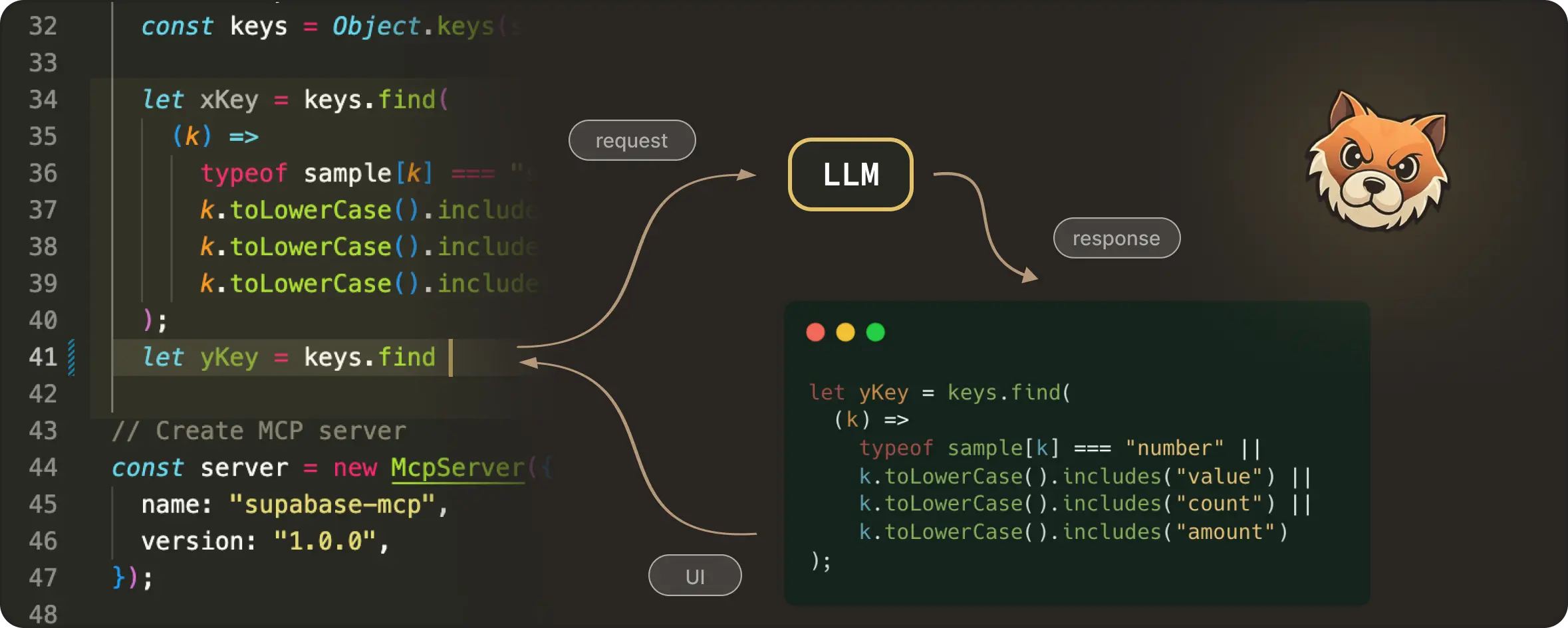
A code editor is a continuously changing space. Developers type, pause, delete, move the cursor, undo, redo, and essentially keep editing, often faster than any model can respond. Even a fast model call involves network latency, debouncing delays, server-side scheduling, and decoding / streaming time.
If not careful, a request that was correct when it was sent can return a response that arrives a few hundred milliseconds too late. Which means now you end up with edit suggestions for code that no longer exists. This is something that’s termed “haunted” for being technically right but not at the right place.
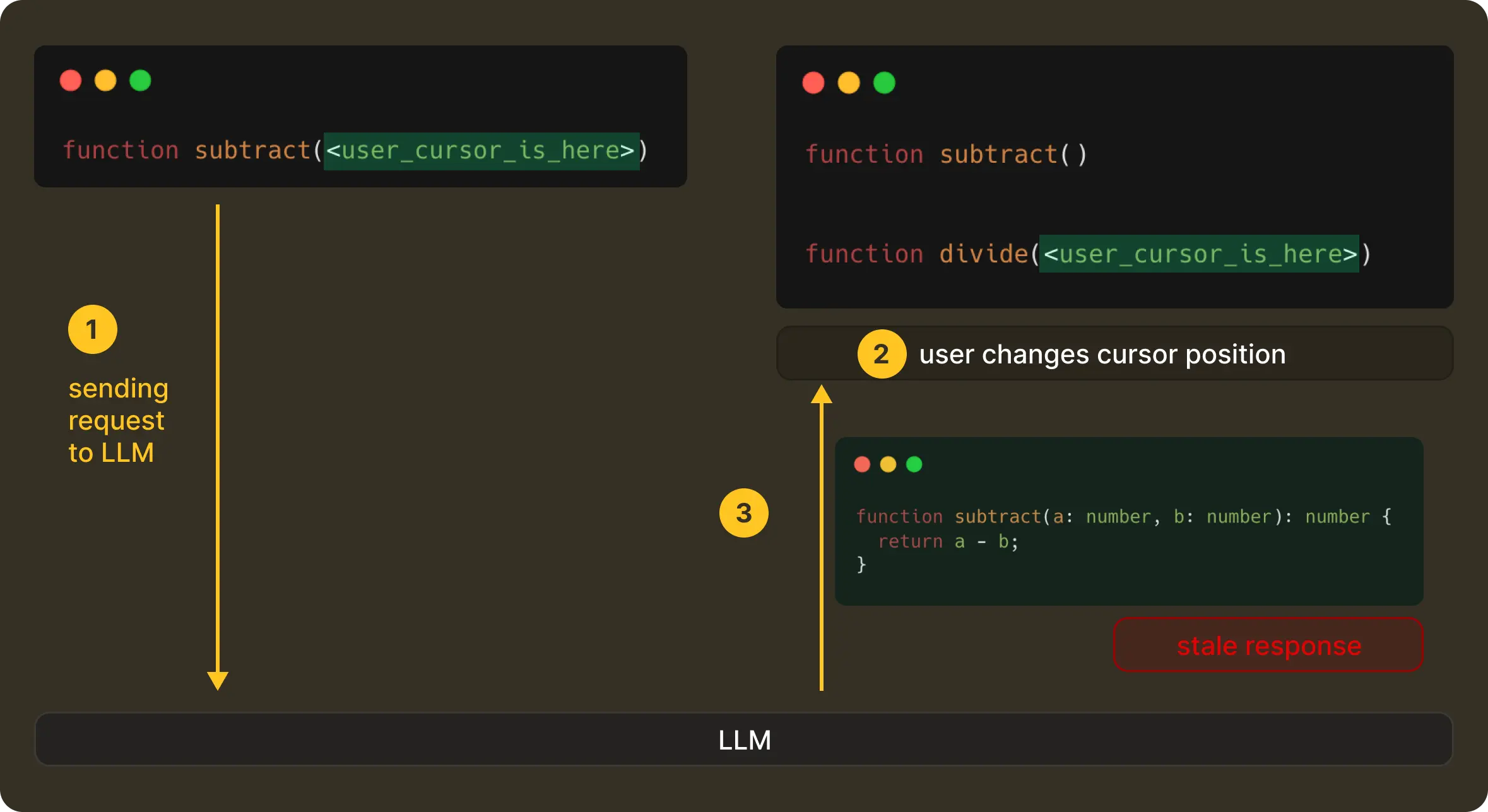
This means, in practice, a correct edit shown at the wrong moment is perceived as wrong by the user. So even with proper context and a good model, it is equally important to have the correct timing. Then only can the product actually feel useful without being distracting.
But getting timing right is challenging, due to the ever evolving nature of the user’s editing state. To make NES feel real-time and helpful, we had to reason about what happens before a request is sent, while it’s in-flight, and after the model responds. This is what we call request management.
Let’s look at it in more detail.
The NES Request Management Lifecycle
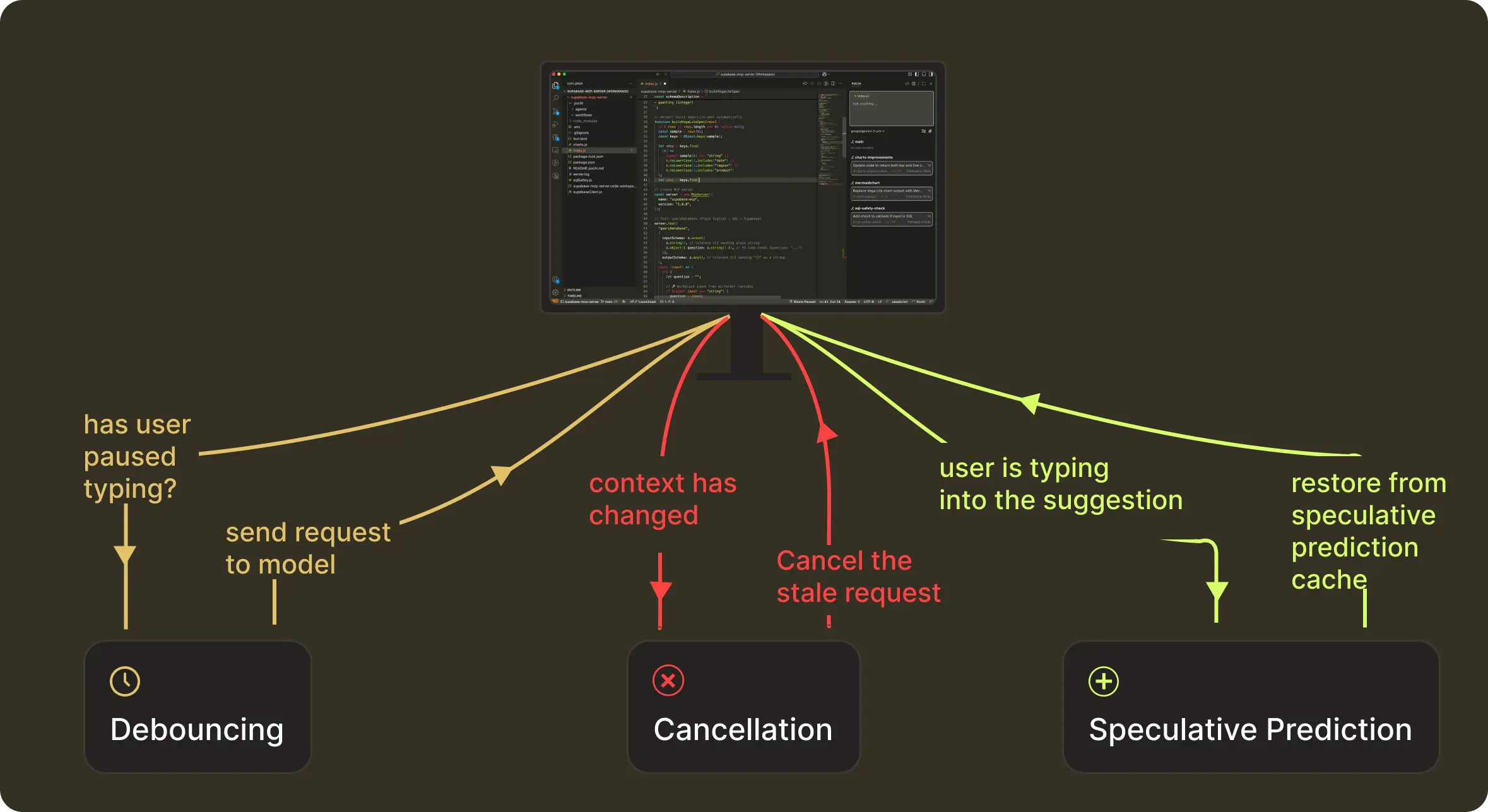
Request Management of a NES prediction happens in three stages:
These map to what we technically implement as debouncing, cancellation, and speculative-prediction caching.
This structure helps bring the intelligent results (what we get with context + model) to users reliably, even as they type continuously. NES continues to run this loop as you type.
Let’s take a closer look at how we handle timing at each stage.
Debouncing: Requesting the Model at the Right Moment
The first question we had to tackle was, “When is the right time to send a request?” When a developer is typing continuously, a request on every keystroke has little value and is wasteful. At the same time, waiting too long would make the system feel unresponsive and slow. We had to find that sweet spot that lies in detecting the exact moment the user actually paused typing.
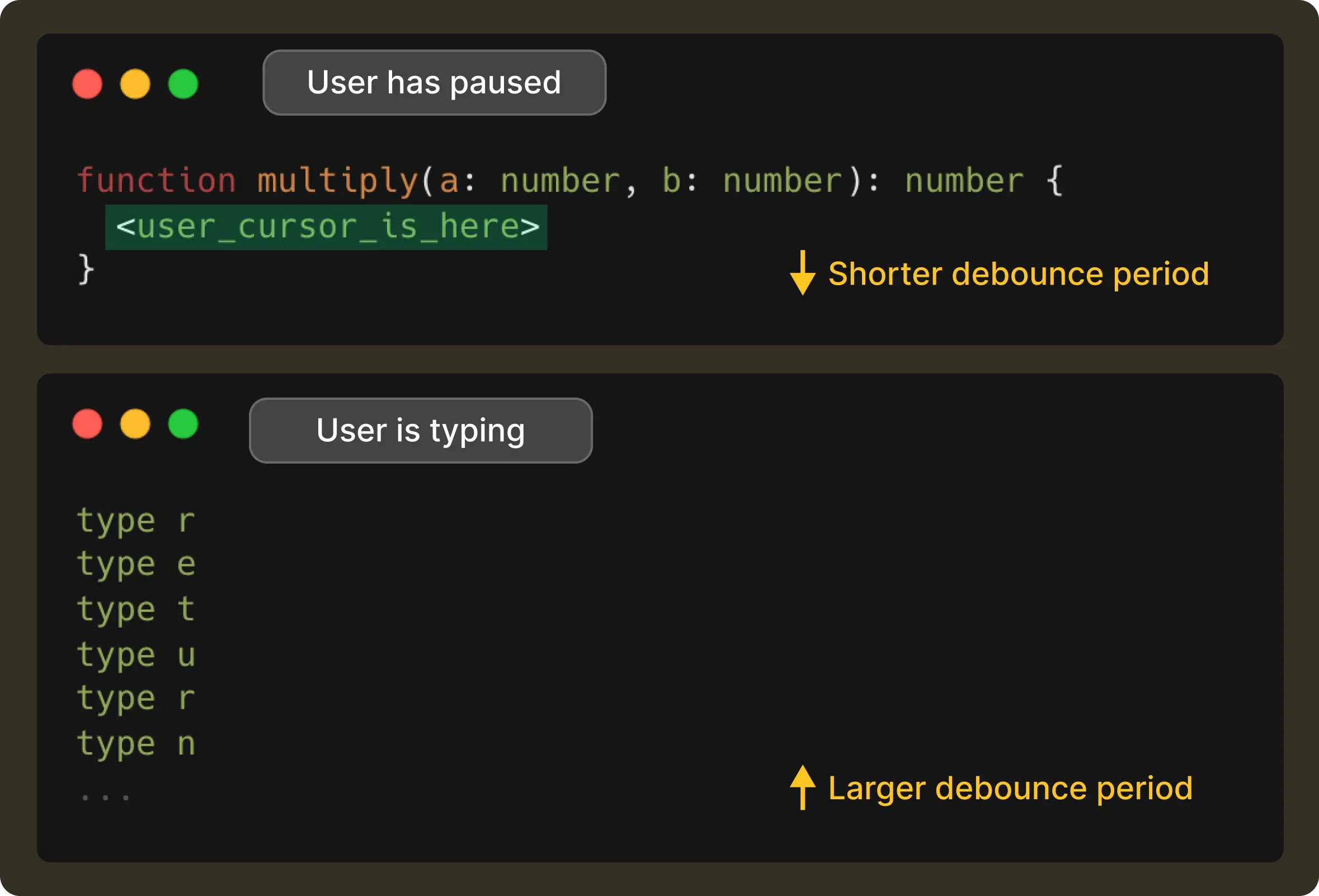
Most systems solve this with a fixed interval, (say, 100ms), but real-world typing isn’t this predictable. Instead, we decided to adapt the debounce interval based on how the user is behaving right at that moment.
To achieve this, we made NES pay attention to a handful of lightweight signals.
For example, typing a . often means the developer is about to pause to access a method of an object, so we get the signal to shorten the debounce delay. Whereas, if the user is continuously typing through a variable name, we stretch the delay a bit to avoid jumping in too early. And if the model’s recent response times have been slower due to network conditions, we account for that too, so suggestions land at the exact moment the user expects them.
This way, the result is a debounce time window that changes with the user’s rhythm. It is short when the user has paused, and long when they’re in flow, all while making sure it never exceeds 1 second.
Cancellation: Correctness Over Completion
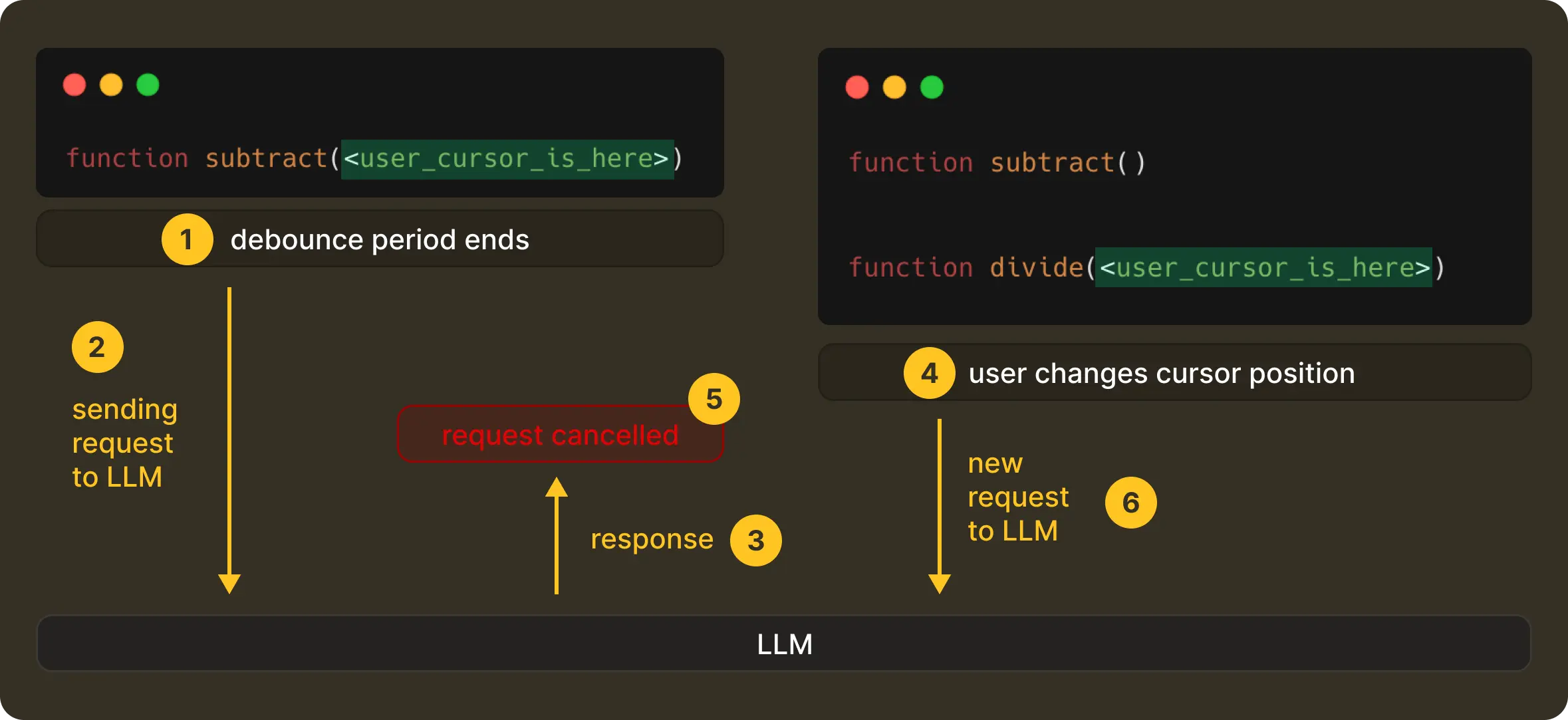
Once a request is finally sent, the editor doesn’t stop moving. A user can continue typing, move the cursor, or undo and redo steps before the model has even started responding. When that happens, the original request becomes stale instantly.
In such a case, we cancel the original request from the client-side, and in turn, the server propagates the cancellation, with any late responses being discarded without ever getting them rendered to the UI.
This is a deliberate design decision that optimises and enforces correctness in a live, ever-evolving editing system. We would prefer that NES show nothing rather than something misleading.
If you’re interested in how this works end-to-end, including streaming behaviour, we’ve written more about it here.
Speculative Prediction: Staying One Step Ahead of the User
Traditional caching is straightforward. If nothing has changed, just reuse the previous response. In the case of NES, this helps to avoid duplicate requests. And to think about it, throwing work away all the time would be expensive if we didn’t balance it out elsewhere.
But we go a step further. When the model returns an edit suggestion, we don’t just cache it for the exact context that produced it, but also speculate on the next few contexts the user is likely to enter.
Now, if the user continues typing along the same trajectory, NES doesn't need to call the model again and can continue serving the speculated suggestion. We call this speculative prediction.
A speculated prediction remains valid as long as the user is essentially still typing into the suggestion and the surrounding context hasn't changed.
It’ll be better to illustrate this with the help of an example. Suppose a user types:

NES sends a request and gets the following suggestion:

If the user then continues to type, resulting in:
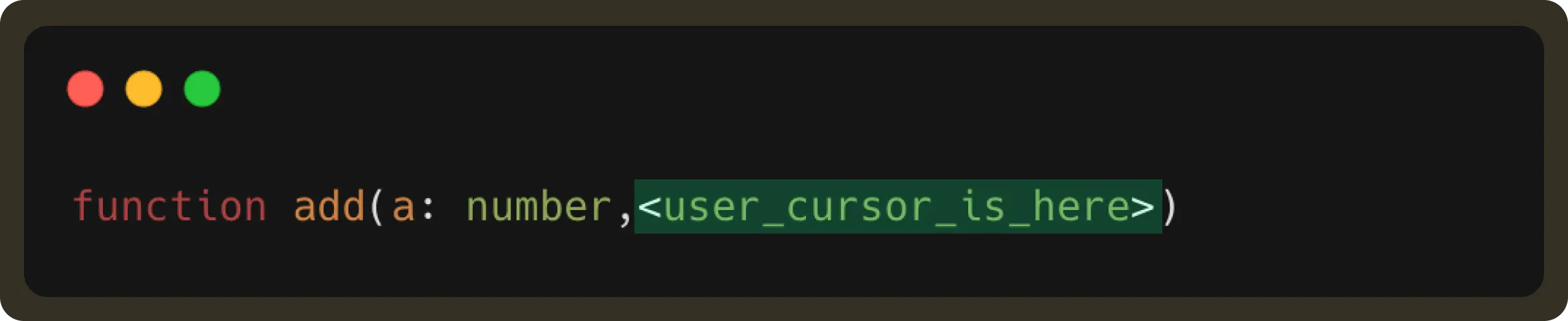
This user edit is part of the received suggestion. Therefore, the suggestion should still be displayed (unless the user has explicitly rejected it by pressing esc).
By retrieving this result from the forward prediction cache, we can display the suggestion faster and reduce LLM request usage.
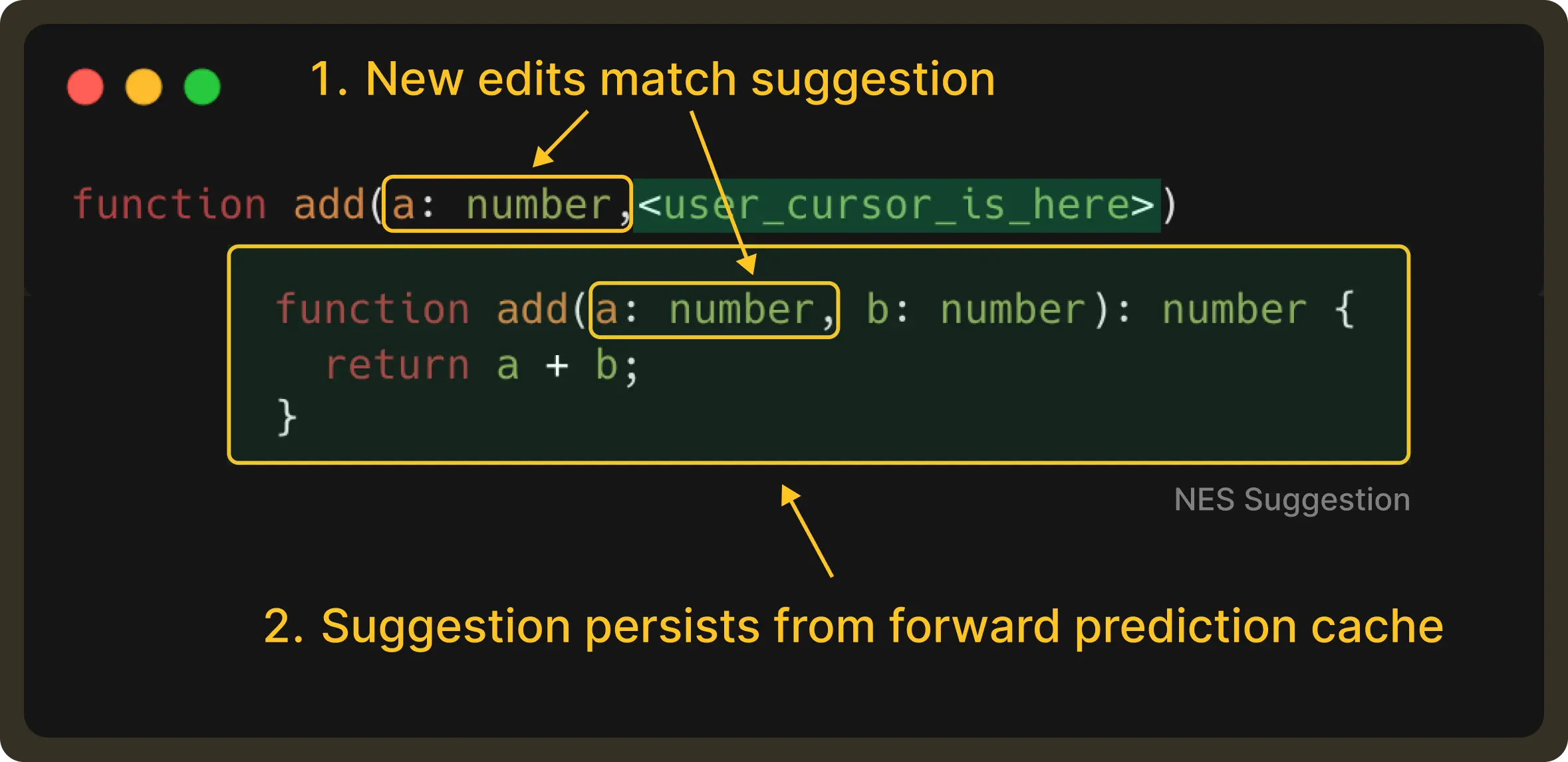
Of course, if the user is not satisfied with the cached suggestion, they still have the option to send a new request to get multiple choices. In essence, forward caching helps accelerate the common path, improving the overall experience.
Conclusion
By the time a suggestion appears in NES, a lot has already happened. Debouncing decides when is the right time to make a request, cancellation makes sure outdated intent never surfaces in the UI, and speculative prediction lets us reuse good existing predictions when the user naturally moves through them.
While you’d find these techniques are familiar in distributed systems, applying them inside a code editor was a challenge of its own. The primary driving factor wasn’t about throughput or load but about every evolving human intent under motion.
What’s next?
So far, we’ve focused on how NES decides what to suggest and when those suggestions should appear. With request management in place, we now have a system that ensures LLM-powered edits reach the user only when they’re truly helpful.
But now that brings us to the next stage of the process: How should these edits be presented?
NES suggestions aren’t always a single line near the cursor. Sometimes the relevant edit is several lines or even several files away. Presenting enough information for a quick action without breaking the developer’s flow is a surprisingly deep design and engineering challenge.
This is especially tricky inside a code editor like VS Code, where rendering options are limited. In such cases, how do we preview multi-line edits precisely? How do we make them feel lightweight, immediate, and skimmable, without being modal or disruptive?
In Part 4, we’ll dive into how we approached these constraints and built a rendering system that enables richer previews and lower-latency interactions for code edits.
Weekly Update #15
TL;DR
This week includes several improvements and bug fixes across the VSCode extension and Web UI.
A mix of workflow enhancements, UI polish, and reliability fixes landed. Here are the highlights:
✨ Enhancements
Improved Worktree Selector in VSCode Web UI: We’ve added support for creating a new worktree with an auto generated name directly from the dropdown; an additional way other than Cmd + Enter a prompt. We also included tooltips and renamed main worktree to workspace in the worktree list UI to better reflect its purpose. #896, #875
Your browser does not support the video tag.
Open diff directly from a task: Clicking a task with diffs now opens both the task and its diff panel, making it easier to review changes directly from the task list. #849
Your browser does not support the video tag.
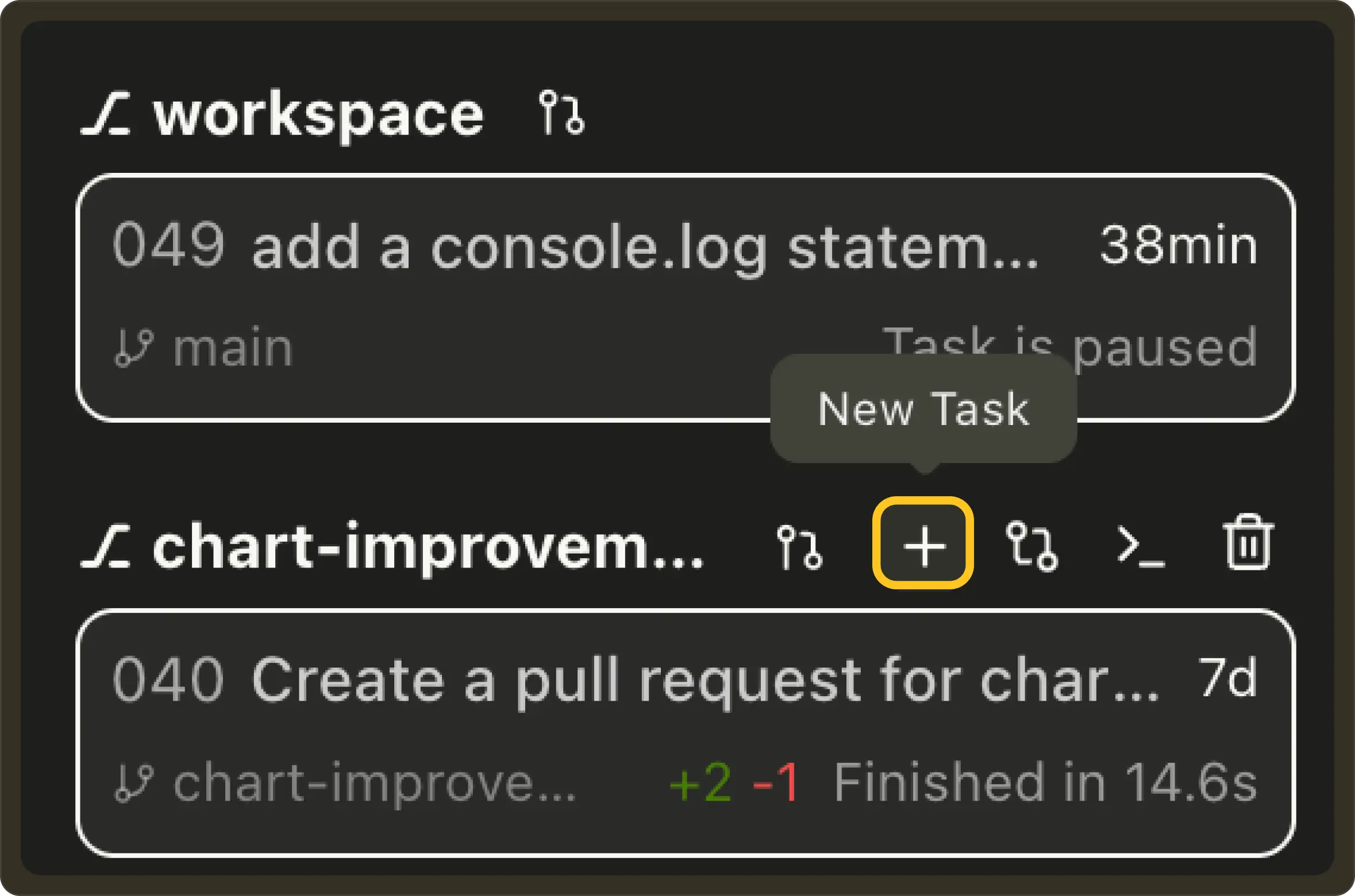
Quick task creation from the Worktree sidebar: Added a + button next to each worktree to create a new task. #877
New keyboard shortcut: Added a Ctrl+ ` keybinding in VSCode to instantly toggle the Pochi layout or open the terminal, improving keyboard-first navigation. This shortcut only exists as an advance configuration at the moment. To enable it, set enablePochiLayoutKeybinding in VSCode settings pochi.advanced section to true. #881
🐛 Bug Fixes
Improved PR fetching reliability: Fixed the GitHub PR fetching logic to exclude pull requests from forked repositories, ensuring only relevant PRs from the main repo appear in the Worktree/PR selector. #893
Closing the Loop: How Reinforcement Learning is Changing AI Coding
TL;DR
Using SFT teaches models how to write code, but it is RL that is necessary to teach them what works. On the other hand, introducing RL in software engineering brings its own specific challenges: data availability, signal sparsity, and state tracking. In this post, we’ll break down how recent works address these challenges.
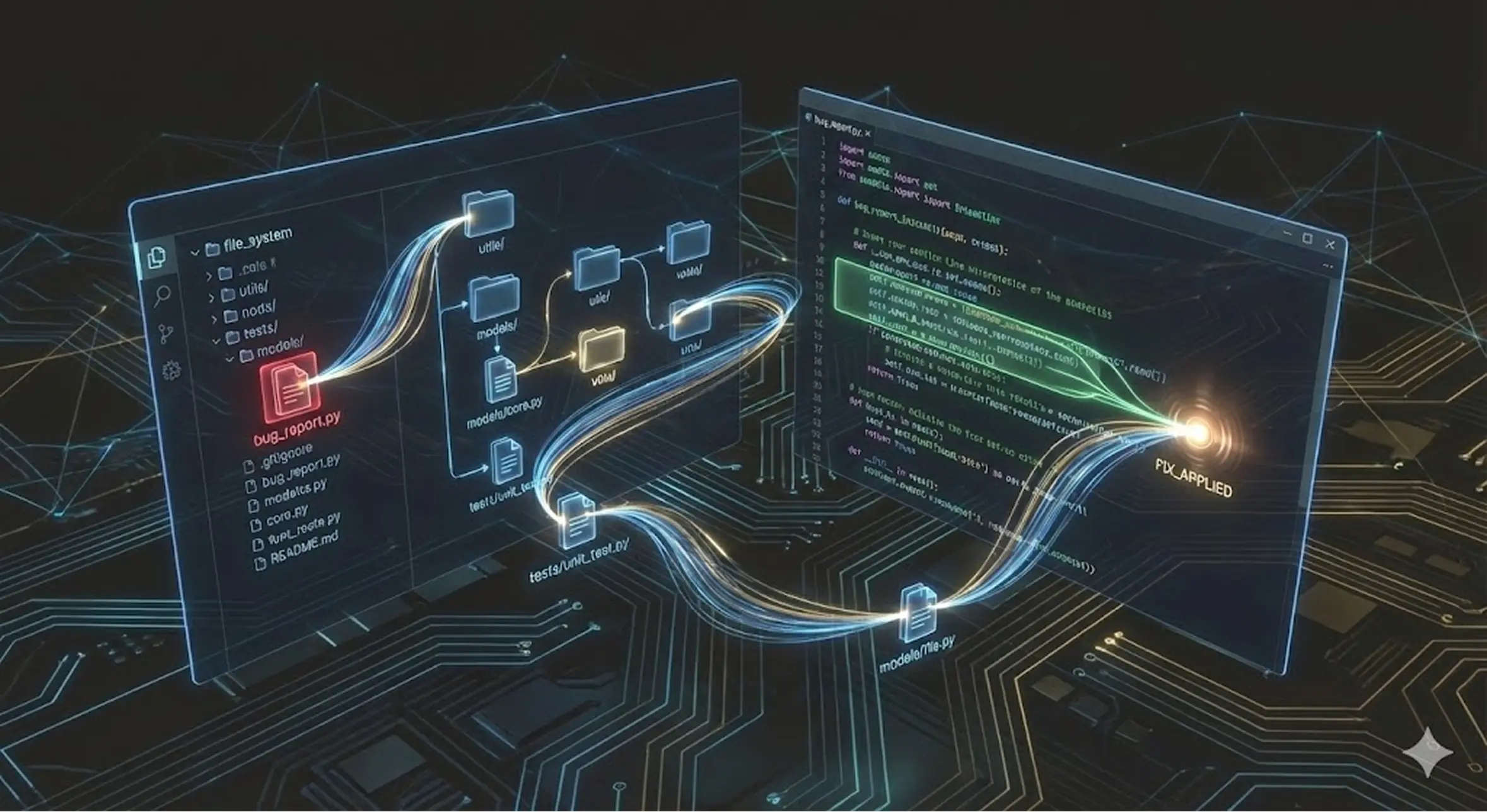
So far, the focus of RL driven improvements had been based on competitive coding. For example, in LeetCode-style tasks, the model works in a closed loop. It generally receives a clear problem statement and in turn, it generates a single, self-contained solution.
This means there are no dependencies involved, no files systems to navigate, and no legacy code that can break. It is exactly like solving a logic puzzle in isolation rather than understanding the engineering implications on the overall codebase.
However, the field of Software Engineering (SWE) in real-world is fundamentally different. It is a stateful, multi-turn interactive problem. A day-to-day involves much more than just writing the correct functions. You often need to navigate a file system, check up on dependency graphs, run the proper tests, and interpret logs in case of errors. This implies, an agent effectively needs to maintain coherence across a long horizon of interactions.
Which is why RL is an ideal candidate for SWE since agent actions produce verifiable results. At the same time, it also introduces challenges that are not present in single-turn tasks. For example,
Recent works from Meta and Moonshot AI surfaced how the industry is pivoting from general reasoning RL to domain-specific SWE-RL to address these challenges.
The Data Problem
In order to learn trial and error, the standard RL requires an agent to interact with an environment. For coding, this means running a test suite or compiling code. As compared to verifying math proof, this simulation will be prohibitively slow and expensive in a real-world setting. Here, the engineering challenges arises to figure out how to bootstrap the entire learning process without being dependent on costly online simulation.
Meta proved that you can bypass the online bottleneck by using the massive offline history of Github. In its recent work on SWE-RL they talked through this approach instead of setting up a live sandbox for every training step.
But offline data lacks a reward signal. For every historical Pull Request, you cannot easily go back in time and execute tests. SWE-RL solves this by creating a process proxy reward. They calculate the fine grained text similarity between the generated patch and the actual developer ground truth solution instead of just checking if the code runs.
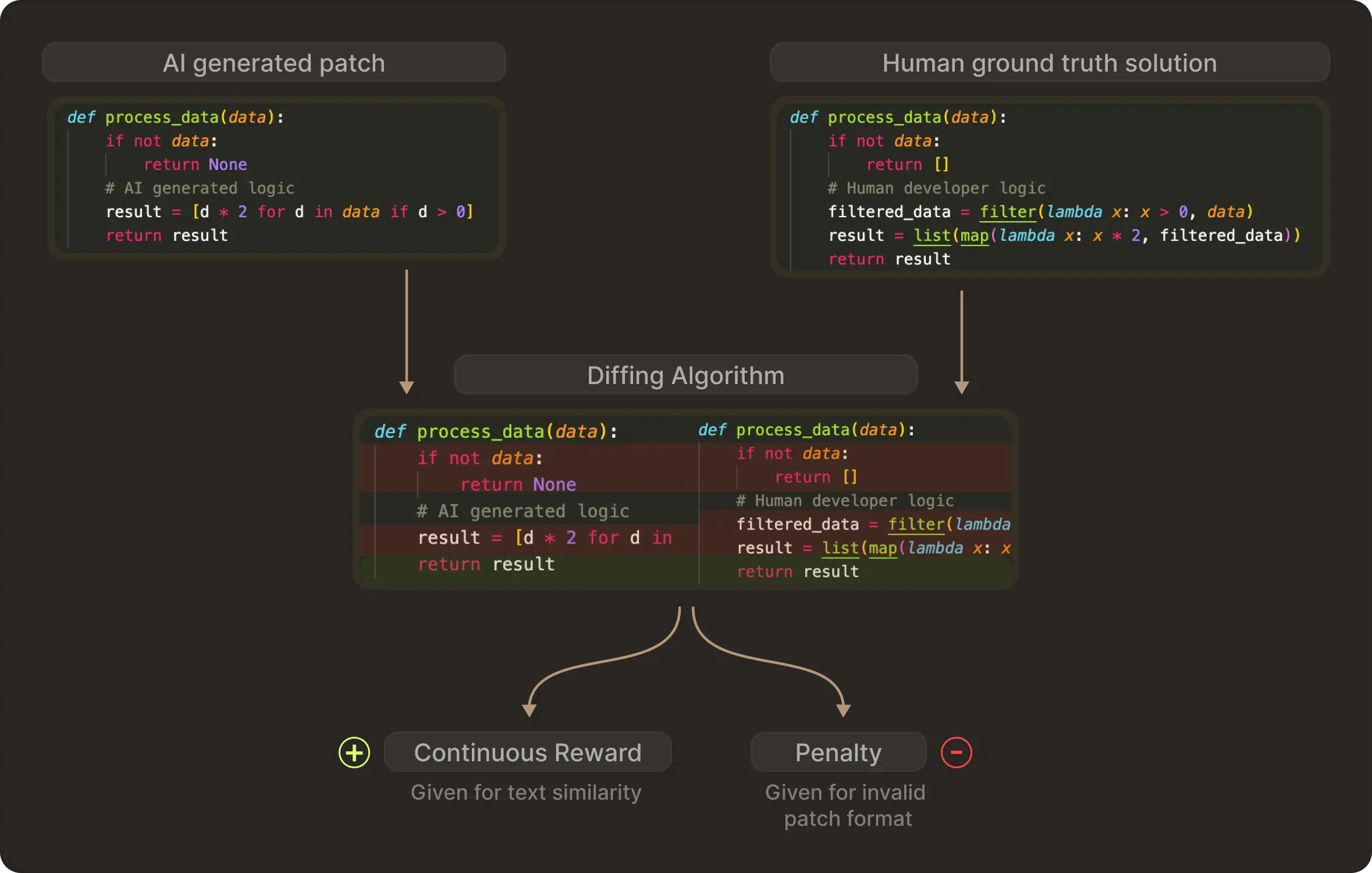
Depending on how closely the generated format matches the human solution, the model receives a continuous reward. On the other hand, if the model generates an invalid patch format, it receives a penalty. This demonstrates that even before touching a compiler, you can teach a model complex engineering behaviours like navigating file structures and adhering to project conventions using static history.
The Signal Sparsity Problem
Next, we have the credit assignment problem while facing online training within executable environments. That means it is difficult to indentify which step really contributed to the final success of the model and which step should get the reward. This reflects on software engineering as any agent can fail after 50 steps of editing and testing. Standard RL struggles to identify which specific step caused the failure.
The Kimi-Dev paper addresses this through task decomposition. It treats software engineering as a composition of atomic skills: the BugFixer (editing logic) and the TestWriter (verifying logic) instead of training an end-to-end agent to solve the issue immediately.
Their solution starts with Agentless RL. They train the model specifically on these short horizon atomic tasks using outcome based rewards. They look for signals on whether the patch passed the test or did the test reproduce the bug. And since the tasks are scoped down, the feedback signal becomes dense and clear.
Kimi-Dev shows that with minimal additional data, a model having these pre-trained capabilities can be adapted to a complex multi-turn agent framework. This suggests that the most efficient path to autonomous agents is rigorous skill acquisition’s followed by workflow adaptation rather than brute force end to end training.
The State Problem: Building a Code World Model
Coming to the final challenge, which is also arguably the most profound. Engineers generally do not just read code as text but also think about the execution loops in their mind. This involves tracking how variables change in memory and how functions interact between files. Meanwhile, since current code LLMs lack this internal compiler engine, they just merely predict the next token based on statistical likelihood.
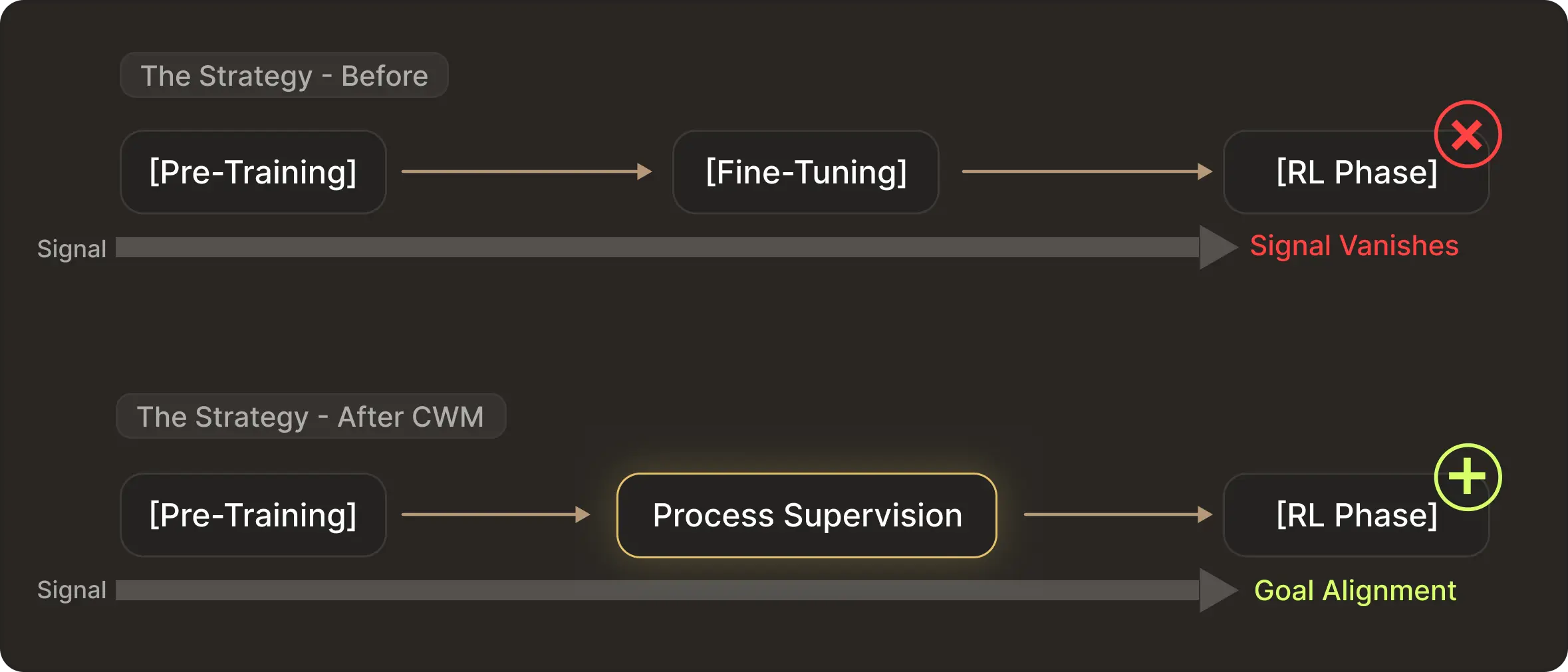
Meta Code World Model addresses this by fundamentally changing the training curriculum. They realized that waiting until the RL phase to teach execution dynamics is too late. The rewards are too sparse and the gradient vanishes on hard problems.
Instead, in the mid-training stage, they inject process supervision directly. To teach the physics of code, they constructed two massive datasets:
Python Execution Traces: With over 120 million examples, the model is trained to predict not just the next line of code, but also the exact state of runtime variables (the values in memory) after every single line.
ForagerAgent Trajectories: Agents with 3 million trajectories that interact with a Docker environment to solve tasks.
This forces the model to internalise a Code World Model. By the time the model enters the final RL stage it is no longer starting from scratch. It already understands if I write X then variable Y changes to Z.
Consequently, the RL stage becomes a process of Goal Alignment. It uses sparse result rewards like passing tests simply to guide a model. It already understands execution physics to select the specific path that satisfies the verification requirement.
Takeaway: Moving Toward Verifiable Agents
This progression from SWE-RL (offline proxy rewards) to Kimi-Dev (decomposed skill learning) and CWM (execution-trace world models) outlines a clear engineering roadmap for the next generation of code models and agentic RL frameworks.
We are seeing a shift from generic reasoning to specialized engineering. Future models will be more than just smart. They will be grounded in repository history, capable of self-verification through test writing, and possess an explicit internal model of runtime state.
At TabbyML we view these developments as the foundation for Verifiable Engineering. The future value of AI in software development lies in building agents that understand and respect the state of your system.
Related Papers:
Weekly Update #14
TL;DR
This release introduces pair of upgrades aimed at making Pochi feel even more native to your development flow: GitHub Issue integration embedded right into task input, and a new Cmd/Ctrl + Enter shortcut to spin up worktrees easily.
🚀 Features
GitHub Issue Integration in Task Input: You can now connect tasks directly to GitHub Issues. Typing @# opens an inline issue selector where you can search by issue ID, keyword, or scroll the dropdown list.
All newly created issues are accessible within a minute. Once selected, issues appear as markdown badges and are sent as enriched context to the model.
Note: This feature requires GitHub CLI to be installed and authenticated. #833
Your browser does not support the video tag.
Create a New Worktree + Task with Cmd/Ctrl + Enter: You can now start a brand-new worktree and task instantly using Cmd+Enter (macOS) or Ctrl+Enter (Windows/Linux). When you submit a prompt with this shortcut, Pochi automatically creates a new worktree with an auto-generated branch name (based on the task description, falling back to a timestamp when needed) and launches a new task inside it.
The shortcut also works when submitting messages with file or image attachments. In existing tasks, Cmd/Ctrl+Enter continues to queue messages as before. #822
Your browser does not support the video tag.
NES Series (Part 2): Real-Time Context Management in Your Code Editor
In Part 1, we covered how we trained our NES model, including topics such as the special tokens we use, the LoRA-based fine-tuning on Gemini Flash Lite, and how we utilized a judge LLM to evaluate the model.
However, the end experience is far more than just building a good model. To make NES feel “intent-aware” inside your editor, we needed to give the model the right context at the right moment.
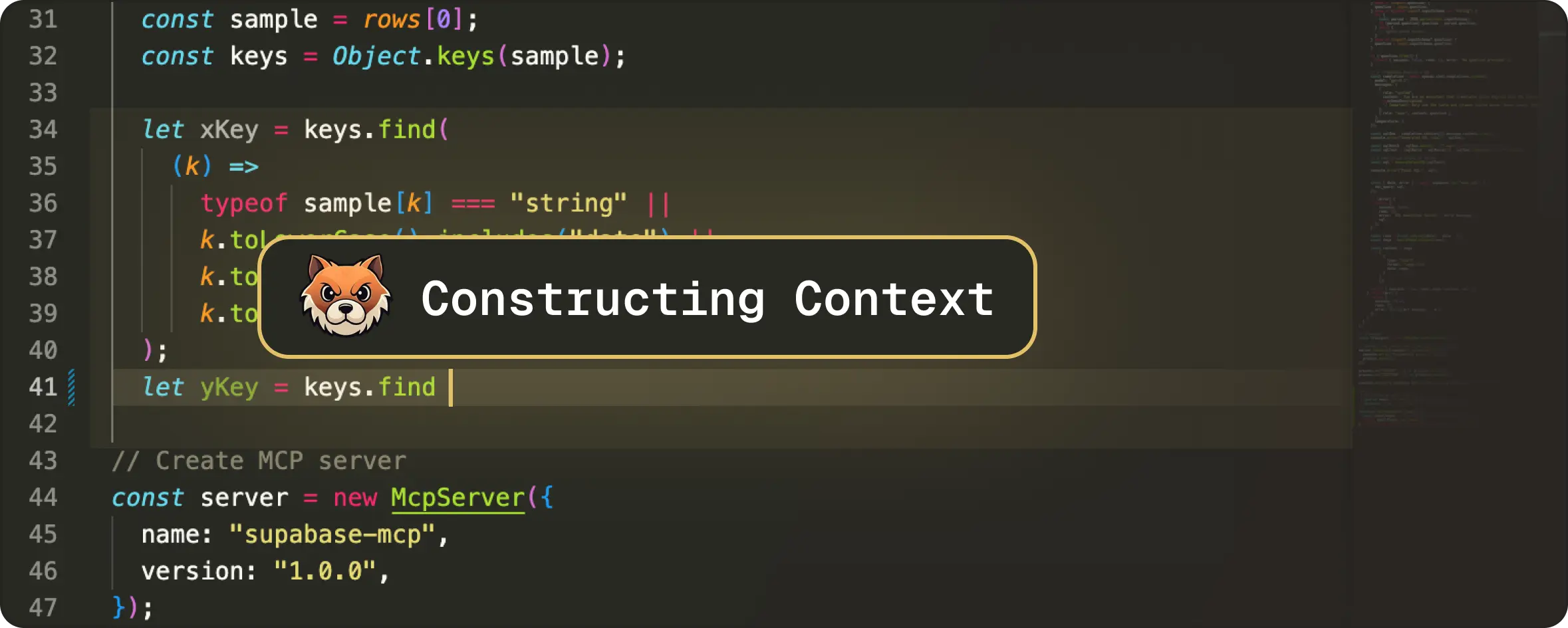
In part 2, we’ll talk about that runtime system, or to be precise, how Pochi manages, ranks, and streams real-time edit context. This is the core that helps NES to understand your intent and predict the next meaningful change.
Why Context Management Matters
To start, let’s understand what context management is. In our case, it’s the layer between when a user starts typing and when the model is called with a well-formed prompt. During that in-between phase, the system gathers and prepares all the relevant context the LLM needs before we make a model request.
As to why it matters, imagine simply sending the entire file to the model on every keystroke. Not only will the model become slower and noisier, but you’d get unstable predictions and over 20 model calls per second, rendering the whole experience unusable.
Instead, as previewed in the first article, we provide NES with three kinds of context:
Each of these depends on clever filtering, segmentation, and timing - all of which happen in milliseconds during normal typing, as we’ll learn below.
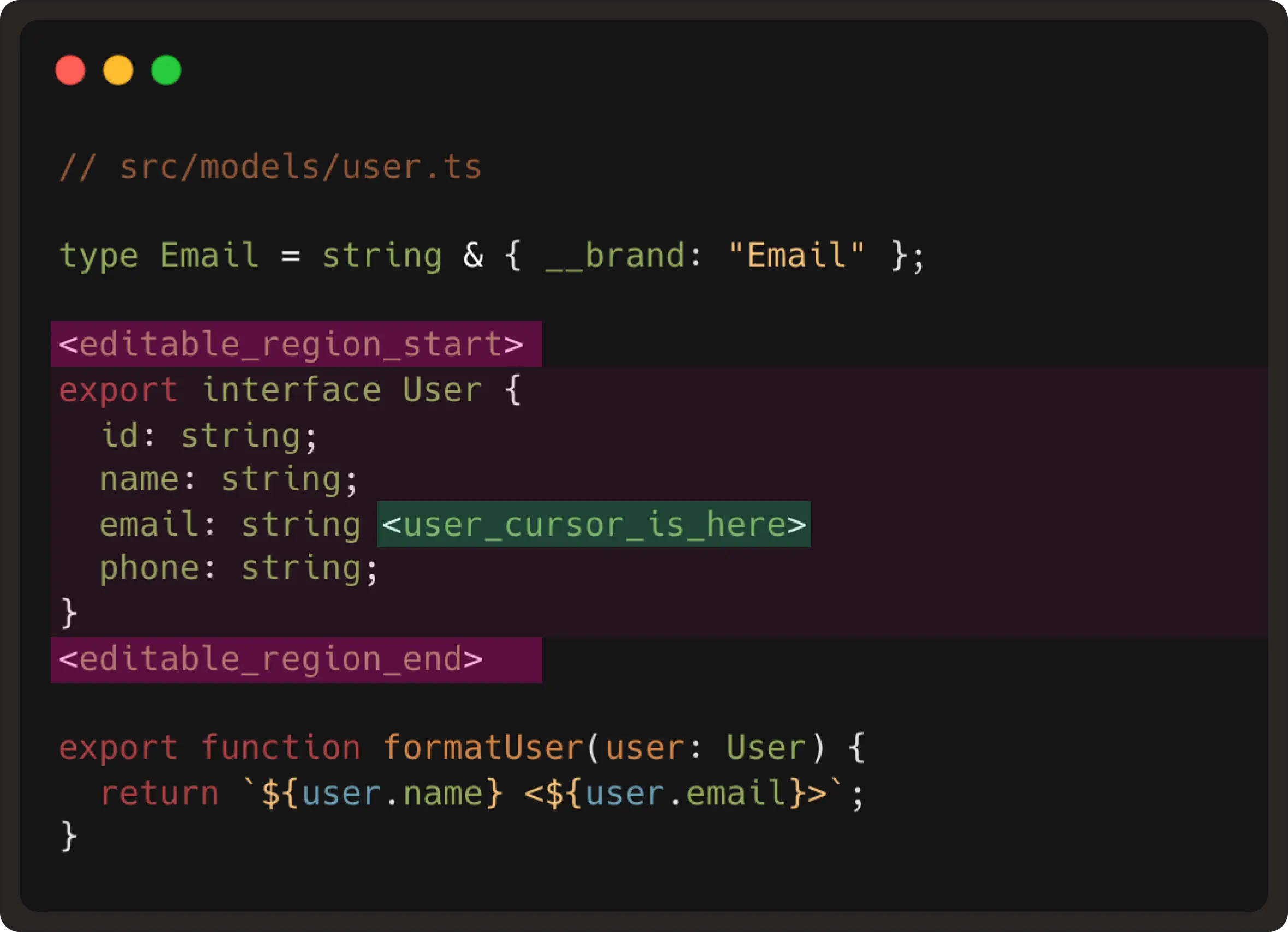
1. File Context: Finding the “live” region of code
The first question to solve: “Where is the user editing right now?”. This is the foundation of every NES prompt. We answer this by gathering three quick pieces of information from the VS Code API:
Why ~10 lines?
Because realistically, the next edit will almost always happen very close to where the user is already editing. This small window keeps the latency extremely low and is large enough to capture the structure around the edit.
And while we observe many models are over-eager and hallucinate changes elsewhere, our model is prevented from rewriting parts of the file the user wasn’t touching.
An example of the editable region would be:
2. Edit history: Following the user’s intent over time
So far, we have learnt where the user is currently editing, but we also need to understand how the code is changing over time. This is the part where edit history becomes important for the edit model to predict the user’s intent.
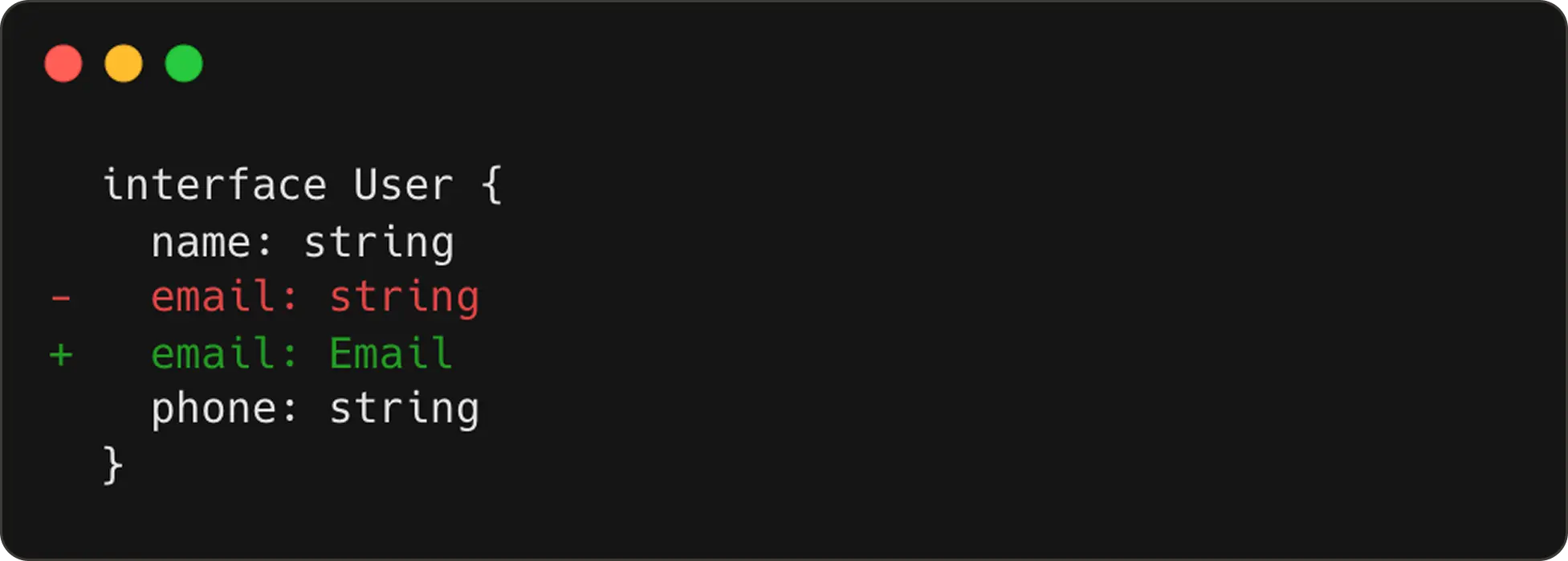
Now, while we could use the VS Code API to register a listener for text change events, this ends up triggering an event for almost every keystroke. For example, if a user updates a type from string to email, it ends up producing ~6 events.

These are not your meaningful edit steps. If we send this to the model, it will think each keystroke is a new “user intent” and will fire too many requests with wildly different predictions. Instead, we reconstruct real edit steps using an internal change segmentation grouping.
How we group events into meaningful steps
Since we cannot directly use the listener events, we decided to reduce them to events that represent edit steps. To achieve this, we group raw text-change events into undo-redo scale units.
Most editors record undo-redo steps on a word scale - for example, when a user inputs a sentence, an undo action will revert the last input word.
In our case, for building edit prediction prompts, we do this on a larger scale.
The first edit step:
The second edit step:
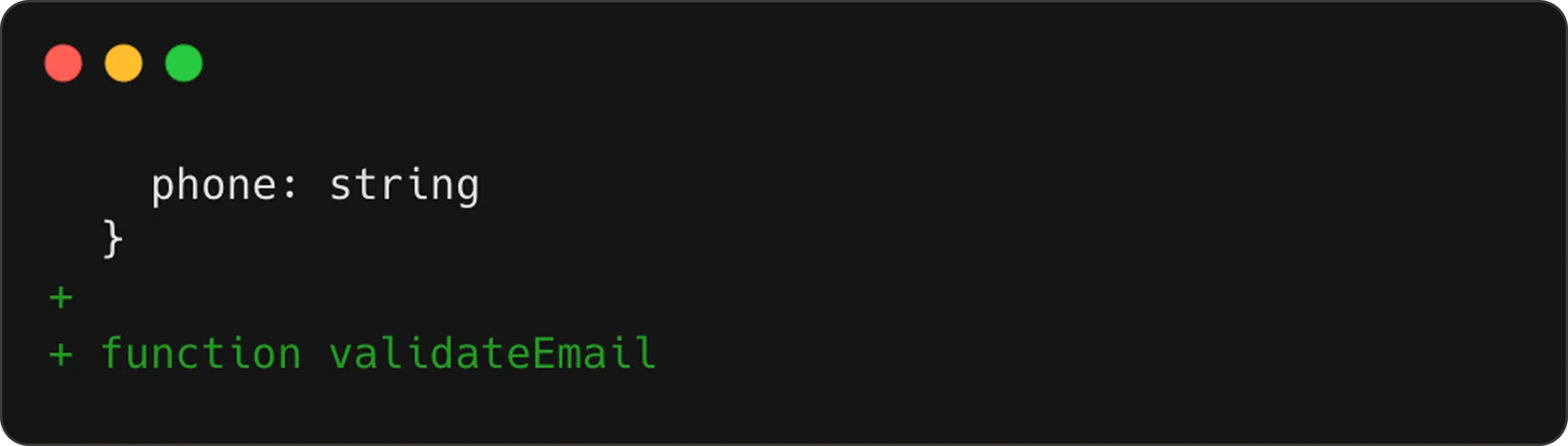
NES receives these steps wrapped inside <|edit_history|> token to learn how the code is evolving.
Special Case: Git Checkout Noise
One edge case we uncovered is when users run git checkout to switch branches. This triggers massive file changes, none of which represent real user intent. If we were to treat these as edit steps, the model would end up thinking the user rewrote half the codebase. In order to avoid polluting the model direction, we:
3. Additional Context: Bringing in the rest of your project
Code rarely exists in isolation. If you’re editing a function call, the model may need the definition. Likewise, if you’re modifying a type, the model may need the type declaration.
To give NES this kind of project-aware understanding, we pull additional snippets using the user’s installed language server. For this, we have two VS Code / LSP APIs:
These two commands are provided by the language server (LSP), which should be available when the language plugin is installed in VS Code. We then extract the definition snippet and include it in <|additional_context|> token as shown below:
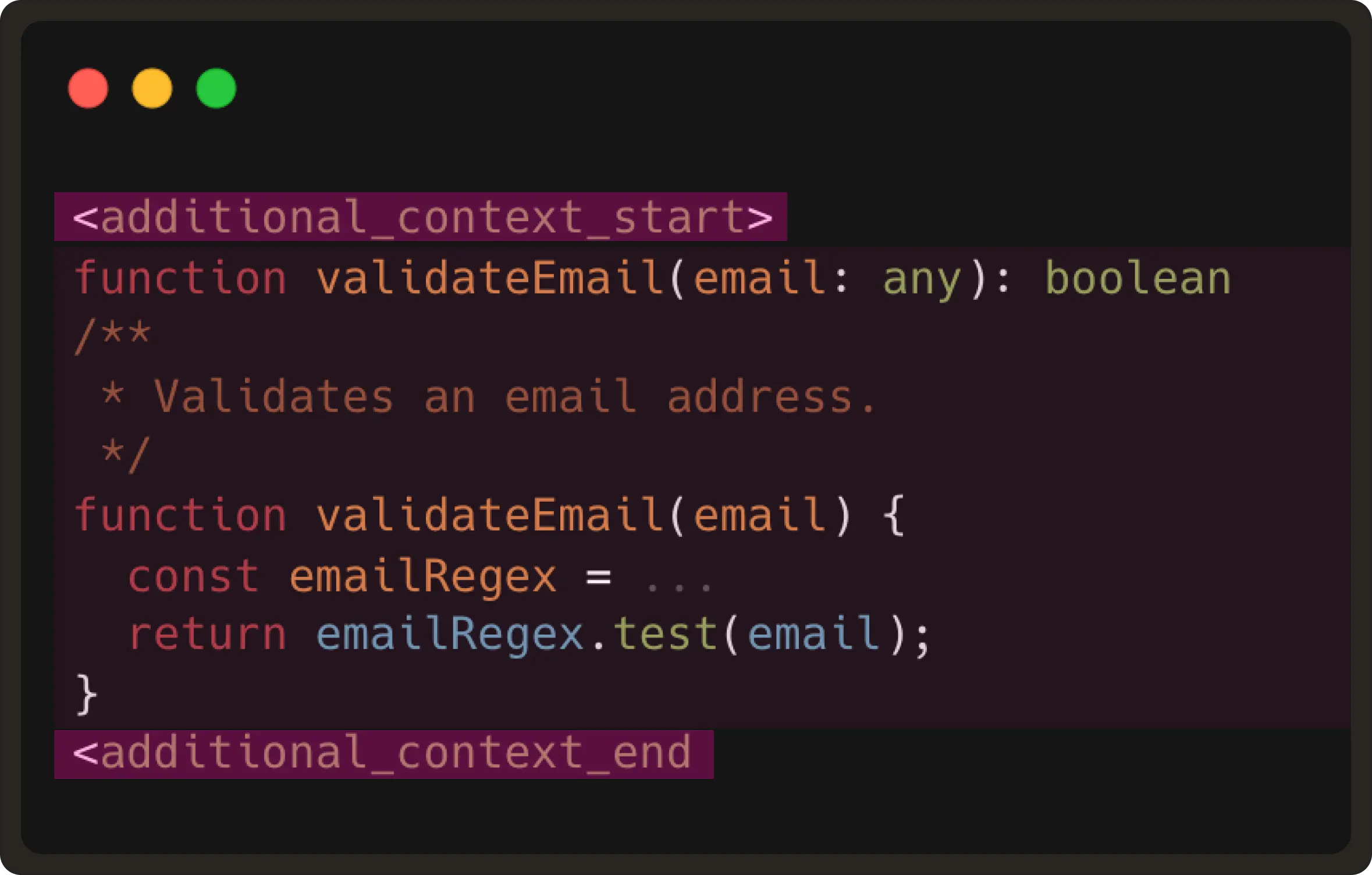
This gives the model the same context a developer would mentally reference before typing the next edit.
Note: We do realise that some of the functions could be huge or a type might be hundreds of lines, with LSP sometimes returning entire class bodies. Therefore, to throttle/limit semantic snippet extraction, we’ve currently hard-coded a maximum of 2000 characters per snippet for now.
Meanwhile, in cases where good LSP support is lacking, like plain text, we don’t add any related snippets context to the prompt. Instead, the prompt will still contain the prefix, suffix, and edit records.
Putting It All Together
As learned above, every NES request contains the <|editable_region|>, <|edit_history|> and <|additional_context|> tokens.
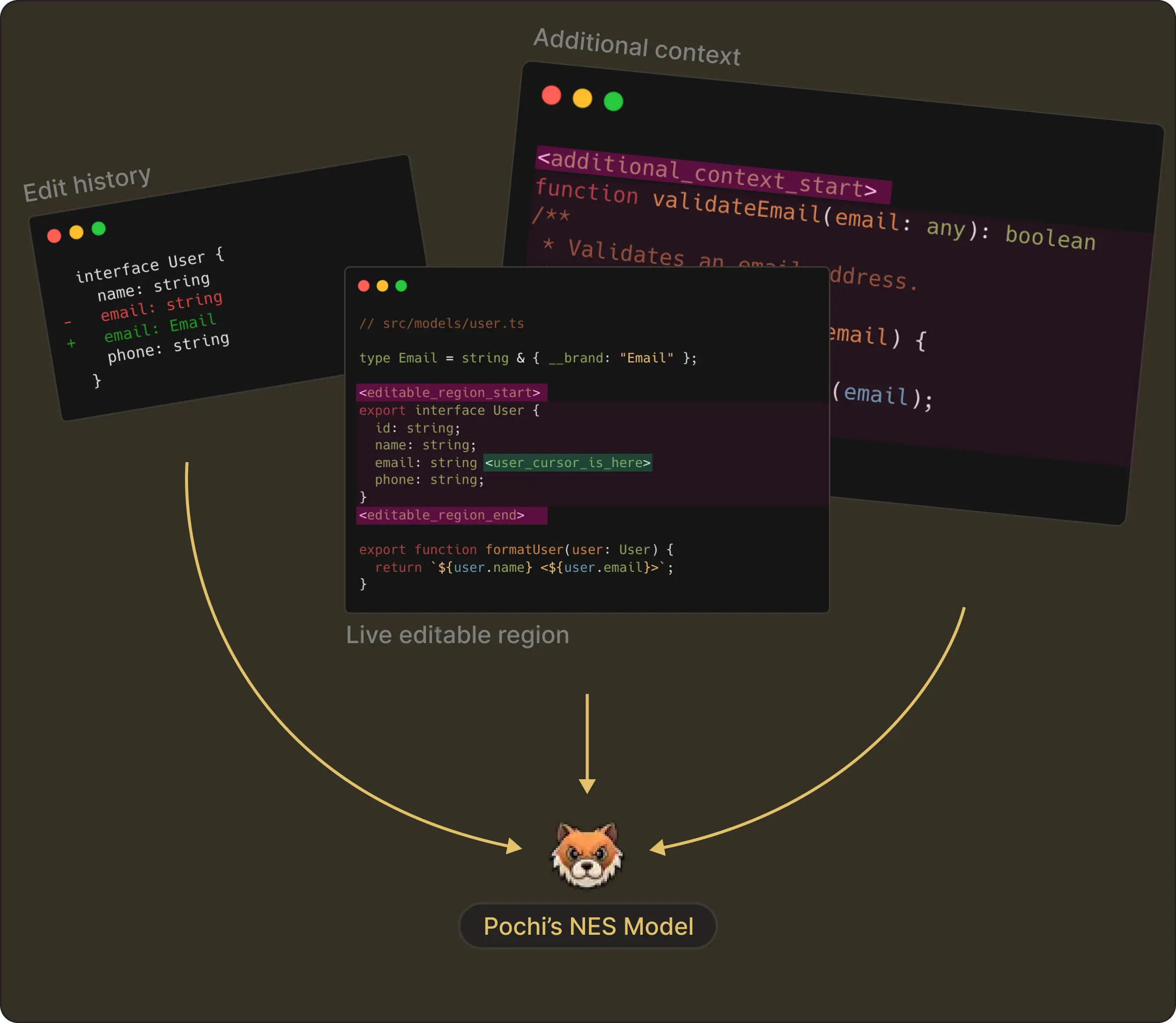
At the end, each piece is carefully constructed into the model exactly the way it was trained. This symmetry between training and runtime makes NES far more reliable than native autocomplete-style approaches.
What’s next?
In our next post, we’ll talk about Request Management, the system that ensures the model never gets a chance to be wrong about the user’s current context.
We all understand real coding experience involves a lot of short, focused typing, moving the cursor to different places, and continuing to edit while a request is still in flight. This means the model requests can become outdated before their response arrives, or worse, it might produce suggestions for code that no longer exists.
One of the reasons NES feels fast is because everything that isn’t the latest user intent is thrown away immediately. This cancellation of stale predictions is one of the biggest reasons Pochi’s NES feels so smooth and accurate.
More on this in our Part 3 post. Read more.
Weekly Update #13
TL;DR
This release brings some of our most practical updates yet: GitHub PR creation directly from worktrees, the ability to fork tasks when an agent drifts, clean task resets when context gets too large, and UI improvements that make multi-worktree setups far easier to manage.
A small step closer to a more transparent, predictable coding agent.
🚀 Features
GitHub PR Workflow: Pochi now understands Pull Requests per worktree. You can create PRs directly from the sidebar, and each worktree shows its associated PR, status (checks running, ready to merge, failed), and a breakdown of CI/Lint/Test results with quick links. PR state persists across sessions and stays linked to your worktree. #747
Your browser does not support the video tag.
Fork a task: You can now fork any task when things go off-track. If an agent drifts, a tool call fails, or you want to try a different direction, hit Fork to spin up a new task starting from the same point in the conversation. The original stays untouched.
Your browser does not support the video tag.
This makes it much easier to debug issues, try alternative fixes, or compare multiple approaches side-by-side. One great use case would be to provide corrective feedback and guide the agent back on track without resetting the whole task. #455
Create a New Task with Previous Context: When a task grows beyond ~50k tokens, Pochi now suggests New Task with Summary option. This creates a clean task with a summary of the previous conversation, helping you avoid hitting context limits while keeping all relevant information. #779
Your browser does not support the video tag.
Auto Layout: We added a new “Pochi Layout” toggle that instantly arranges your VS Code workspace into an optimized 3-pane layout: the Pochi task view on the left, code/diffs on the upper right, and terminals in a separate bottom-right tab group. This keeps terminal output isolated, prevents accidental layout shifts, and makes long-running tasks much easier to follow. #733
Your browser does not support the video tag.
✨ Enhancements
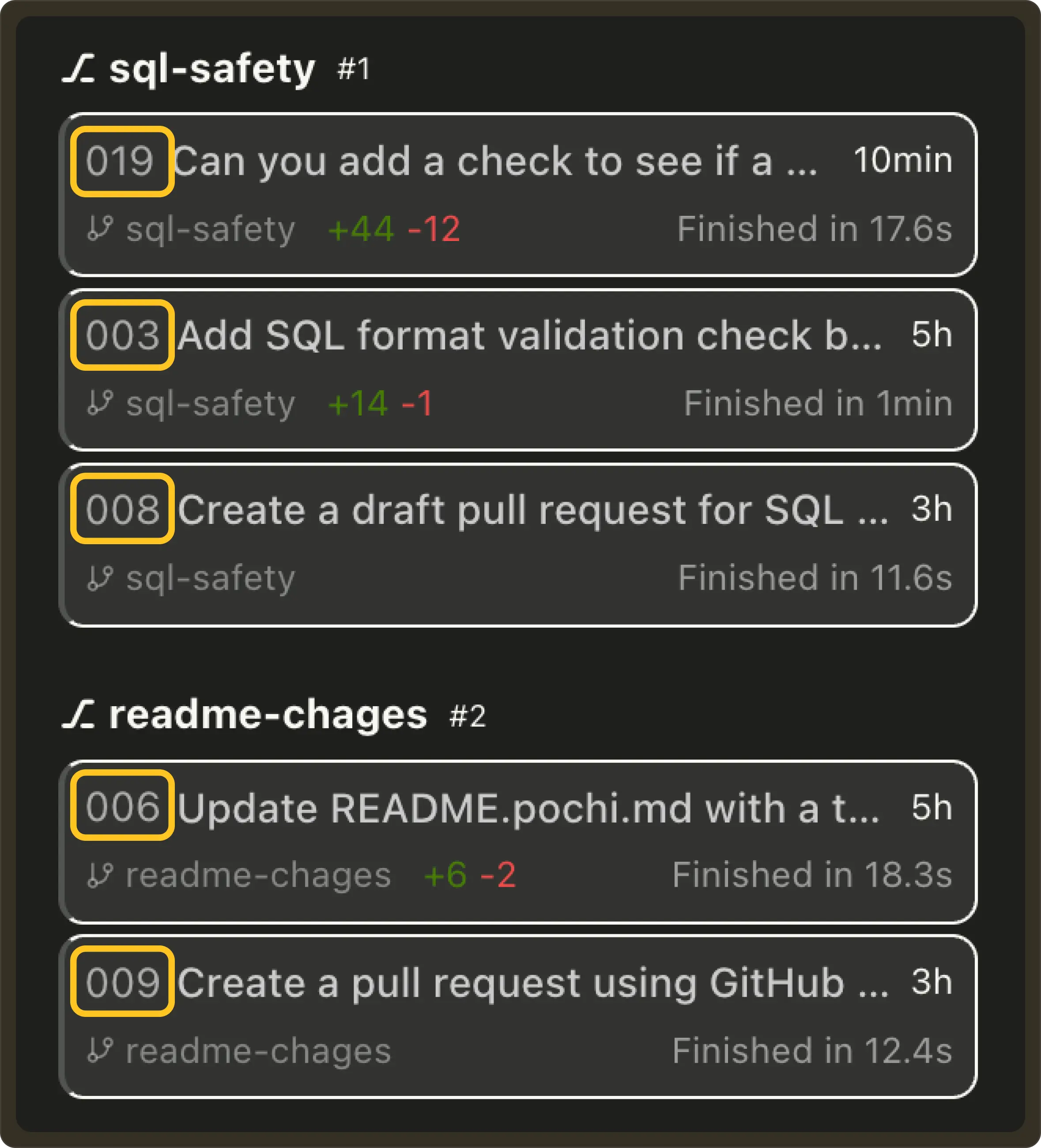
Incremental Task IDs: Tasks now receive a simple incremental ID (#001, #002, …) that is shared across all worktrees within the same Git repository. This makes tasks easier to reference while still preserving grouping by worktree in the UI. #746
Optimistic Worktree Deletion: Deleting a worktree now updates instantly in the UI, making the worktree disappears immediately without waiting for the backend to confirm. This makes task management feel faster and keeps the sidebar in sync with your intent.
Your browser does not support the video tag.
🔥 Preview
Weekly Update #12
TL;DR
This weeks update is packed with improvements to task visibility, worktree workflows, and NES accuracy. We also made foundational changes to how tasks are stored, which sets us up for upcoming GitHub and multi-worktree features.
Breaking Change: Task list reset in v0.16.0
We introduced a breaking change in v0.16.0 that may result in the loss of the task list after upgrading. No action is needed as new tasks will behave normally going forward.
🚀 Features
✨ Enhancements
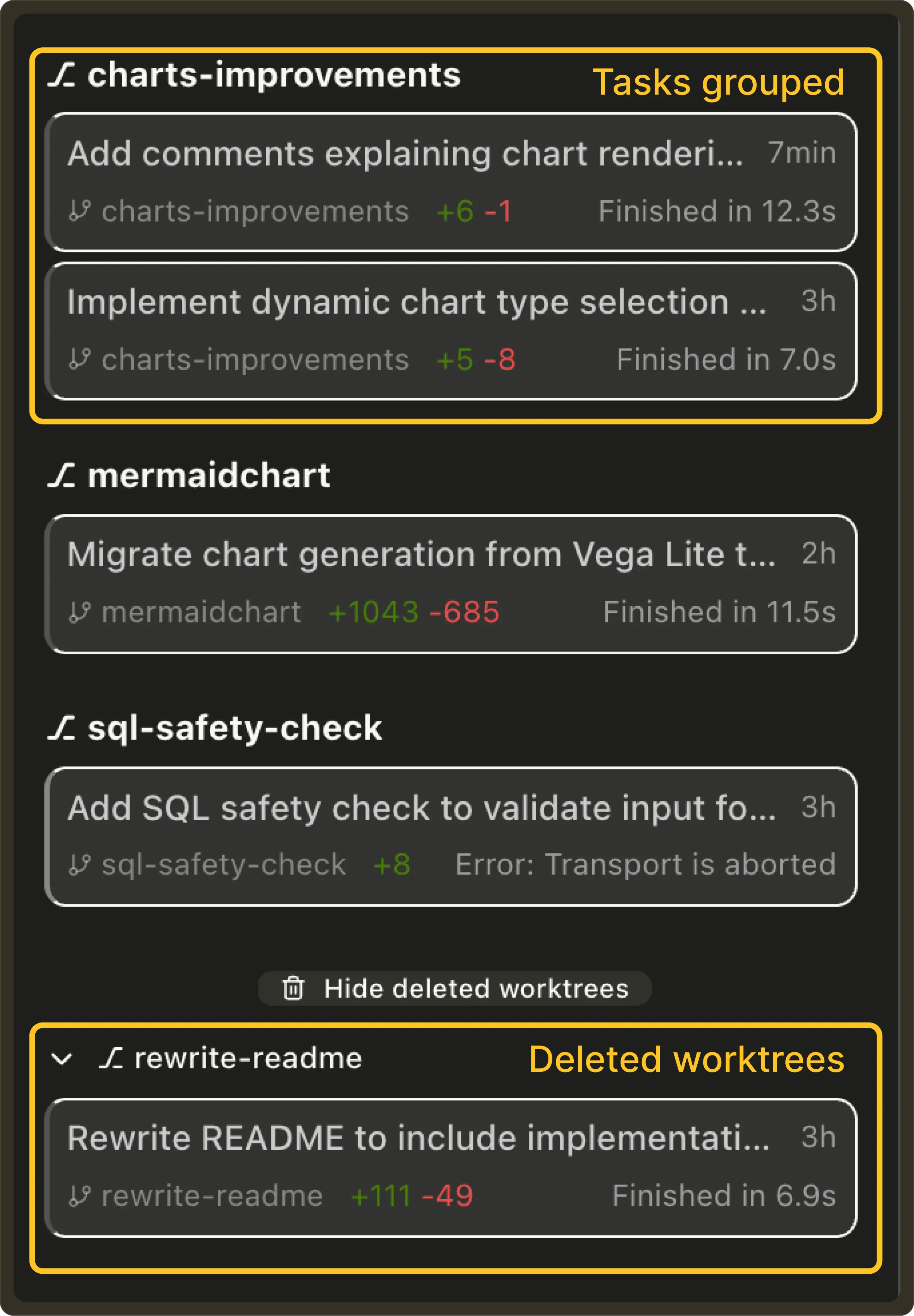
Tasks grouped by worktree: Pochi automatically groups tasks by their associated Git worktree with active worktrees at the top and deleted worktrees collapsed into a dedicated section. Each worktree shows its own tasks, status, and metadata which makes it much easier to manage parallel workstreams and multiple agents. #676
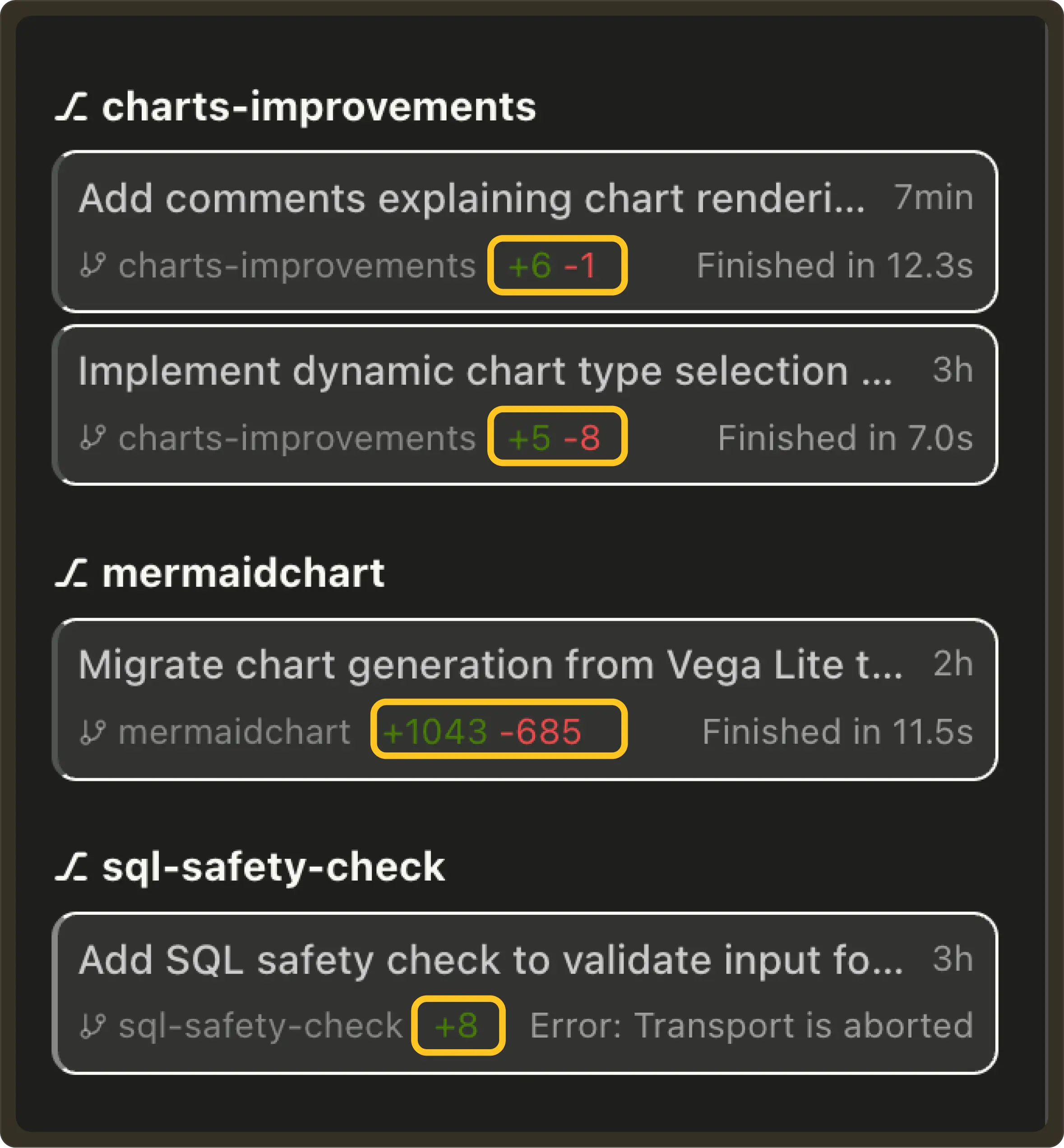
Diff Summary on Task List Item: Task rows now display git diff summaries (e.g. +23 -5) so you can instantly see the size and impact of each task’s changes across multiple worktrees. #674
Worktree-aware task tabs: Pochi now opens tasks from the same Git worktree in the same VS Code tab group, and tasks from different worktrees in separate tab groups. This keeps parallel branches visually separated while you work. #677
🔥 Preview
Weekly Update #11
TL;DR
This week was a big one.

We shipped Next Edit Suggestions (one of our biggest upgrades so far), along with real-time task notifications and cleaner diff views. Pochi now feels smarter, tighter, and much more intuitive across the codebase.
🚀 Features
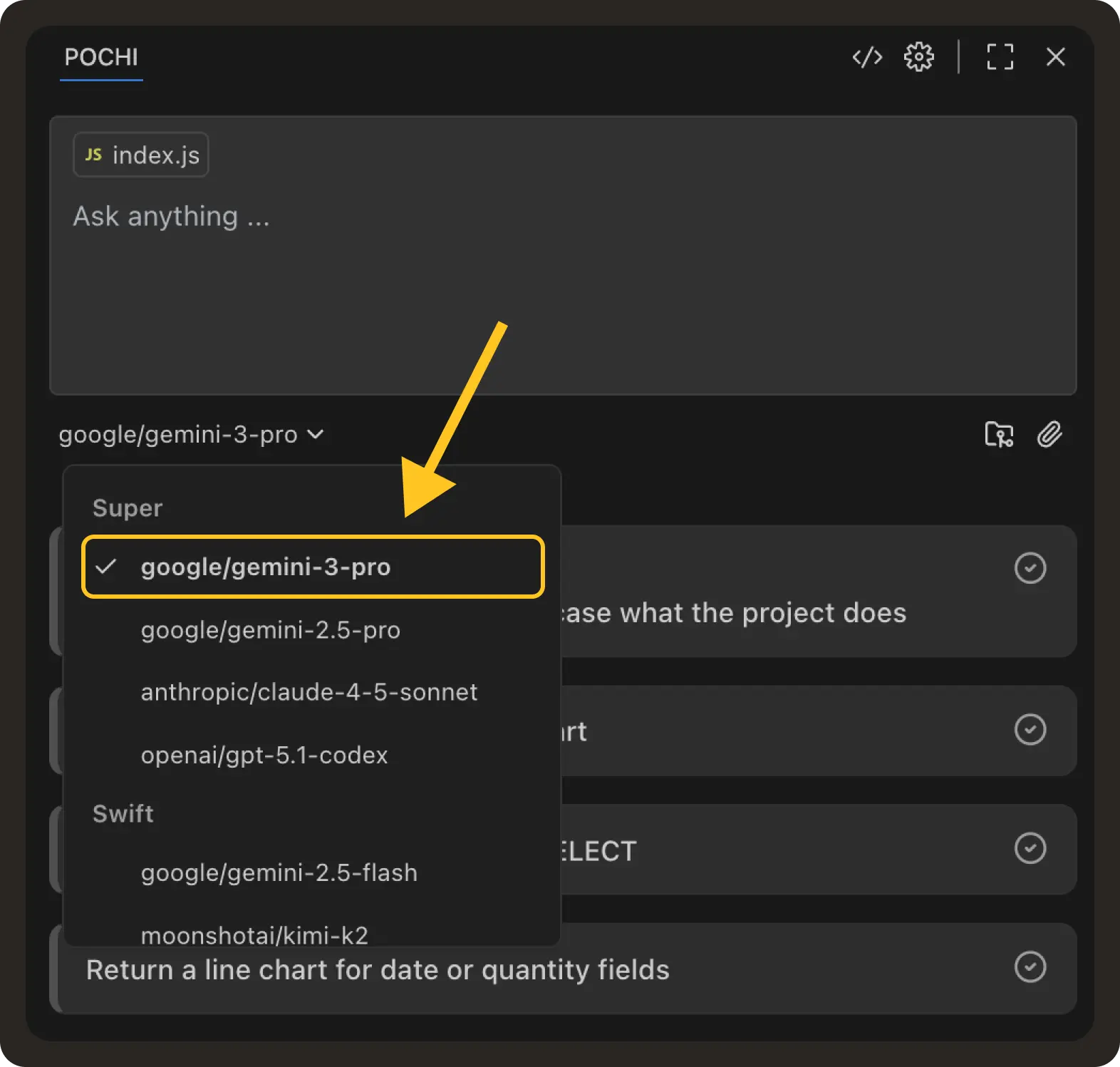
✨ Enhancements
🔥 Preview
NES Series (Part 1): The Edit Model Behind Tab Completion
Note
This is a four-part series on how we trained and built our NES model at Pochi, covering everything from the edit model behind tab completion to real-time context management, request lifecycles, and dynamic rendering for AI code edits.
Read the full series:
– Part 1: The Edit Model Behind Tab Completion
– Part 2: Real-Time Context Management in Your Code Editor
– Part 3: The Request Management Lifecycle Under Continuous Typing
– Part 4: Dynamic Rendering Strategies for AI Code Edits
In this post, we’re introducing our internal edit model, the foundation behind Next Edit Suggestion (NES). It’s an upgrade to Tab completion, designed to predict the next change your code needs, wherever it lives.
Technically this is much harder to achieve, since NES considers the entire file plus your recent edit history and predicts how your code is likely to evolve: where the next change should happen, and what that change should be.
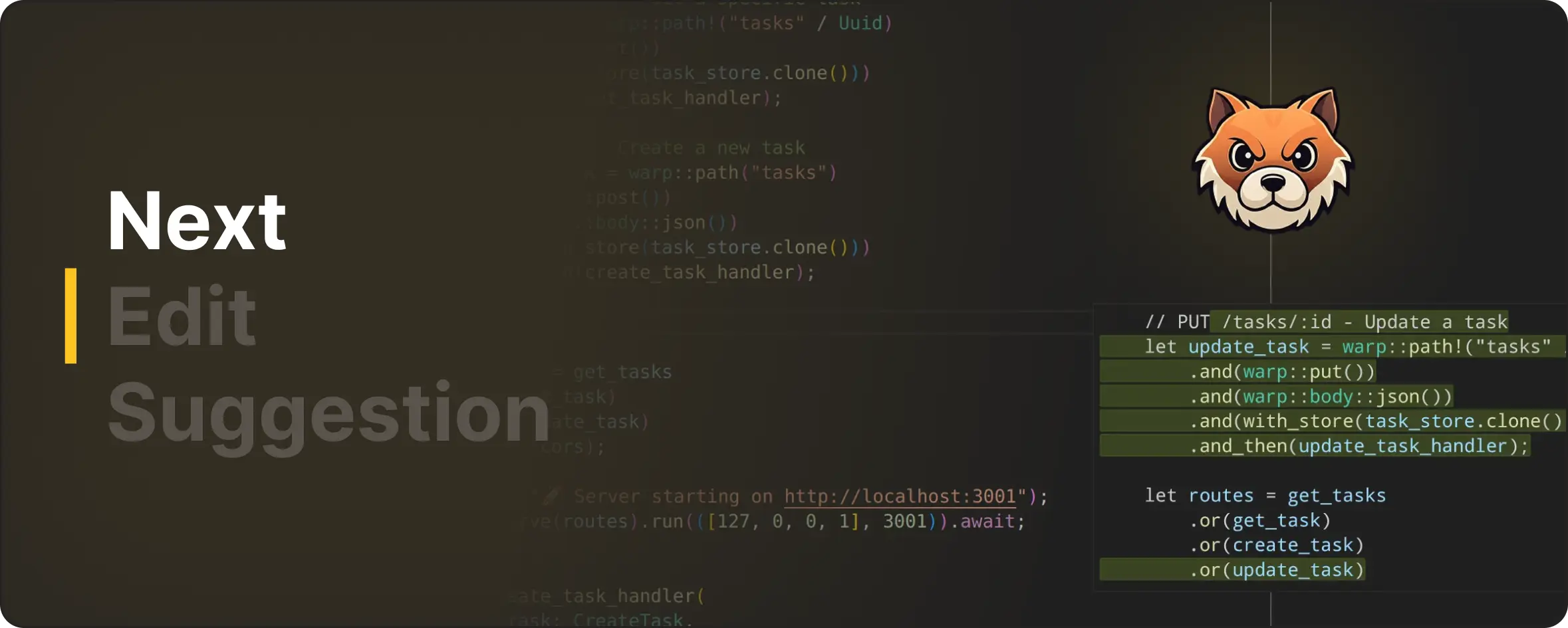
Other editors have explored versions of next-edit prediction, but models have evolved a lot, and so has our understanding of how people actually write code.
As an open-source team, we want to share this work transparently. This is the first post in our "Next Edit Suggestion" series, where we walk you through how we trained the underlying model to how it powers real-time editing inside the extension.
How We Train the Edit Model
When we decided to build NES, one of the first pressing questions on our mind was: What kind of data actually teaches a model to make good edits?
It turned out that real developer intent is surprisingly hard to capture. As anyone who’s peeked at real commits knows, developer edits are messy. Pull requests bundle unrelated changes, commit histories jump around, and the sequences of edits often skip the small, incremental steps engineers actually take when exploring or fixing code.
The Training Process
To train an edit model, we format each example using special edit tokens. These tokens tell the model:
Unlike chat-style models that generate free-form text, NES is trained to predict the next code edit inside the editable region.
Below is an example of how NES predicts the next edit:
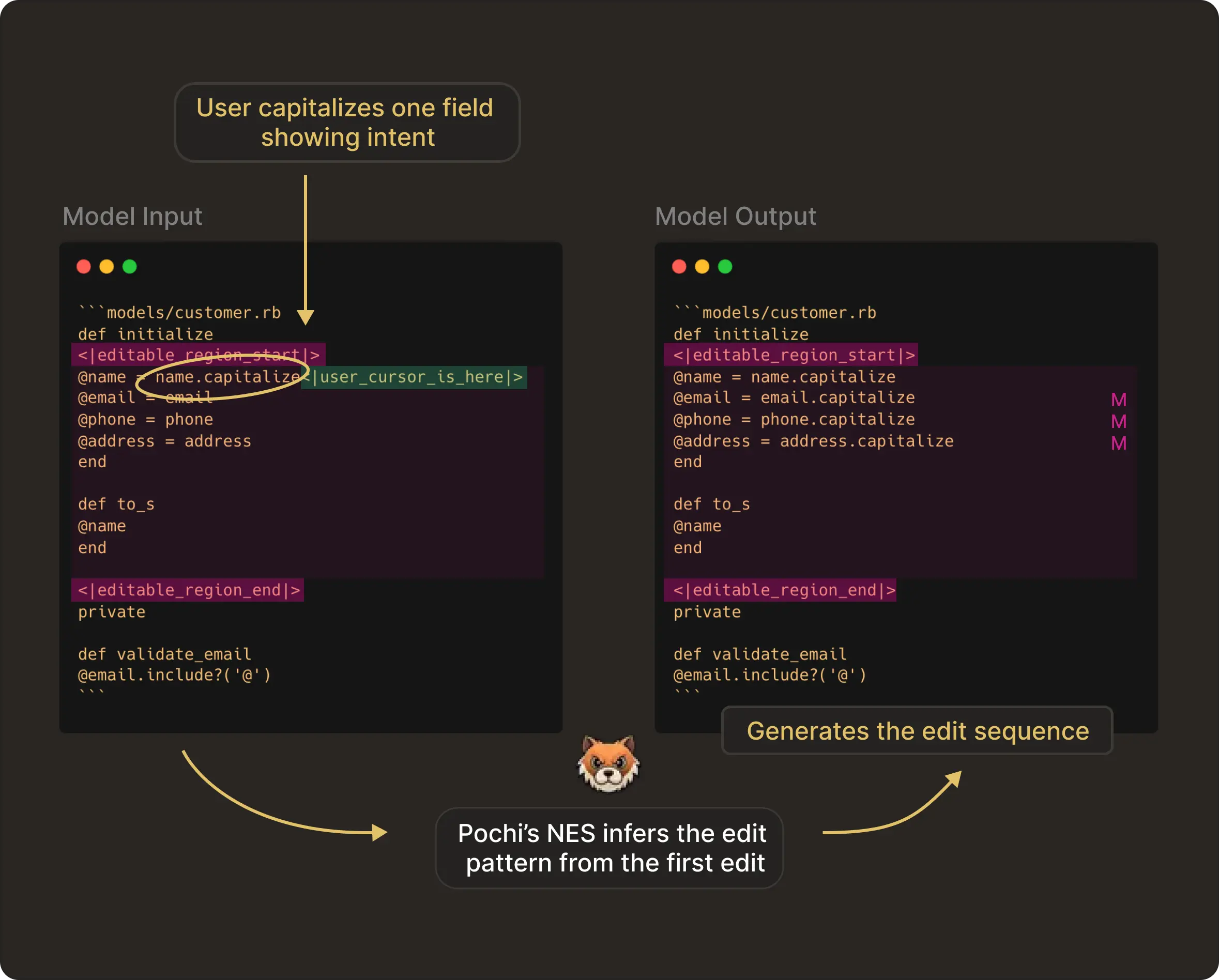
In the image above, the developer makes the first edit allowing the model to capture the intent of the user. The editable_region markers define everything between them as the editable zone. The user_cursor_is_here token shows the model where the user is currently editing.
NES infers the transformation pattern (capitalization in this case) and applies it consistently as the next edit sequence.
To support this training format, we used CommitPackFT and Zeta as data sources. We normalized this unified dataset into the same Zeta-derived edit-markup format as described above and applied filtering to remove non-sequential edits using a small in-context model (GPT-4.1 mini).
Choosing the Base Model for NES
With the training format and dataset finalized, the next major decision was choosing what base model to fine-tune. Initially, we considered both open-source and managed models, but ultimately chose Gemini 2.5 Flash Lite for two main reasons:
Easy serving: Running an OSS model would require us to manage its inference and scalability in production. For a feature as latency-sensitive as Next Edit, these operational pieces matter as much as the model weights themselves. Using a managed model helped us avoid all these operational overheads.
Simple supervised-fine-tuning: We fine-tuned NES using Google’s Gemini Supervised Fine-Tuning (SFT) API, with no training loop to maintain, no GPU provisioning, and at the same price as the regular Gemini inference API. Under the hood, Flash Lite uses LoRA (Low-Rank Adaptation), which means we update only a small set of parameters rather than the full model. This keeps NES lightweight and preserves the base model’s broader coding ability.
Overall, in practice, using Flash Lite gave us model quality comparable to strong open-source baselines, with the obvious advantage of far lower operational costs. We can , keeping the model stable across versions.
Why this matters for you
Using Flash Lite directly improves the user experience in the editor. As a user, you can expect faster responses and likely lower compute cost (which can translate into cheaper product).
And since fine-tuning is lightweight, we can roll out frequent improvements, providing a more robust service with less risk of downtime, scaling issues, or version drift; meaning greater reliability for everyone.
How we evaluated the model
We evaluated our edit model using a single metric: LLM-as-a-Judge, powered by Gemini 2.5 Pro. This judge model evaluates whether a predicted edit is semantically correct, logically consistent with recent edits, and appropriate for the given context. This is unlike token-level comparisons and makes it far closer to how a human engineer would judge an edit.
In practice, this gave us an evaluation process that is scalable, automated, and far more sensitive to intent than simple string matching. It allowed us to run large evaluation suites continuously as we retrain and improve the model.
Enhancing Context at Inference
Training and evaluation only define what the model knows in theory. To make Next Edit Suggestions feel alive inside the editor, the model needs to understand what you are doing right now. So at inference time, we give the model more than just the current file snapshot. We also send:
Your recent edit history
Wrapped in <|edit_history|>, this gives the model a short story of your current flow: what changed, in what order, and what direction the code seems to be moving.
Additional semantic context
Added via <|additional_context|>, this might include type signatures, documentation, or relevant parts of the broader codebase. It’s the kind of stuff you would mentally reference before making the next edit.
Here’s a small example image showing the full inference-time context with the edit history, additional context, and the live editable region which the NES model receives:
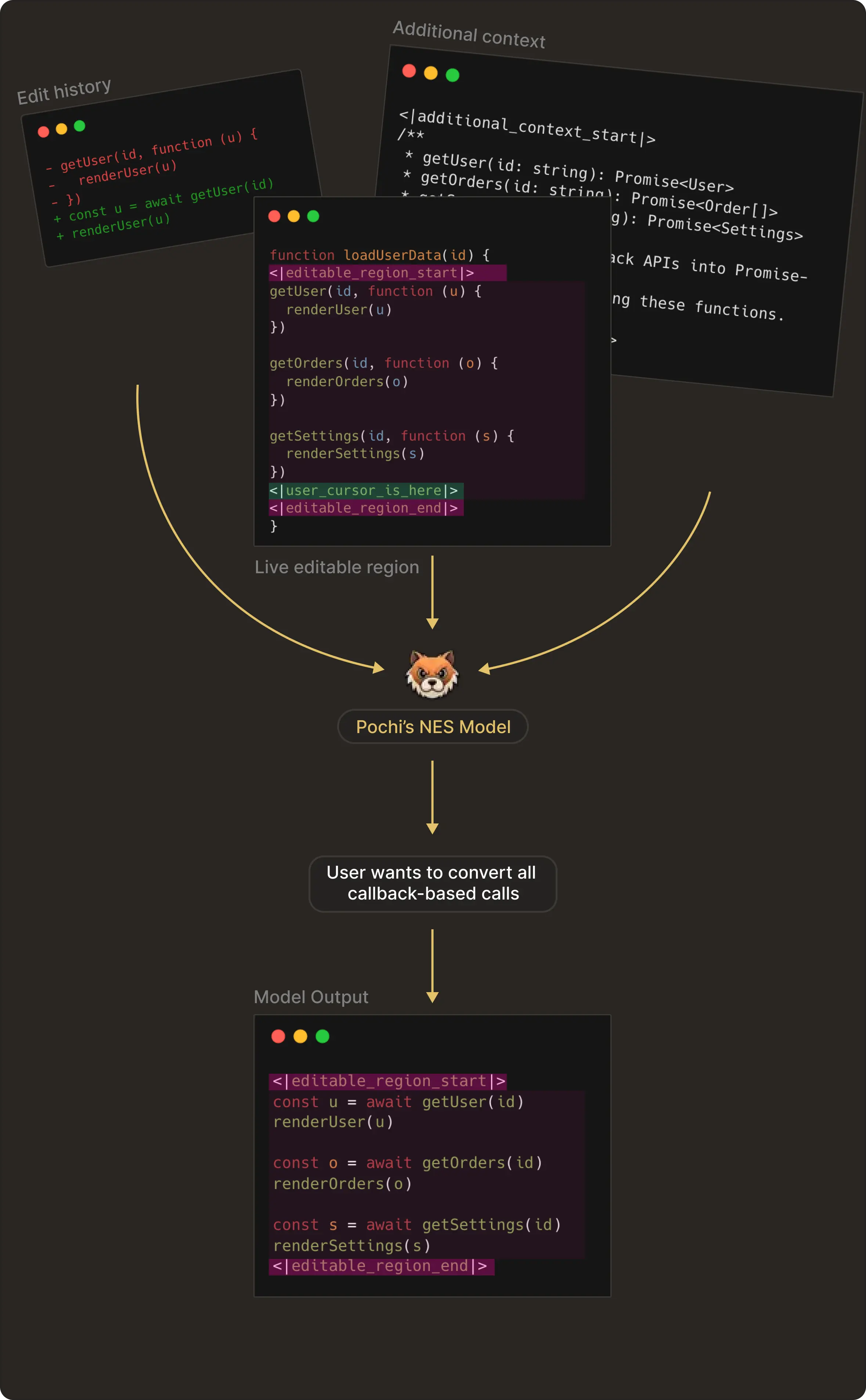
NES combines these inputs to infer the user’s intent from earlier edits and predict the next edit inside the editable region only.
In this post, we’ve focused on how the model is trained and evaluated. In the next post, we’ll go deeper into how these dynamic contexts are constructed, ranked, and streamed into the model to drive real-time, context-aware edit predictions.
Weekly Update #10
TL;DR
We added modular @import rules and fixed PDF handling in readFile. Behind the scenes, we’re preparing two big improvements: smart task notifications and a refreshed, faster tab-completion experience.
✨ Enhancements
🐛 Bug fixes
🔥 Preview
Launching Parallel Agents
Teams rarely work on a single task at a time. You might be part-way through a feature when a bug report arrives, someone needs a small refactor reviewed, or a documentation fix is pending. Most tools and workflows force these tasks to share one working state.
So you end up switching branches, stashing and popping changes, resetting your workspace, and trying to hold the original task in your head. This is context switching, and it’s one of the biggest hidden costs in software development.
We released Parallel Agents to remove that cost. Each agent runs in its own Git worktree, which isolates the task’s state from the rest of your work.
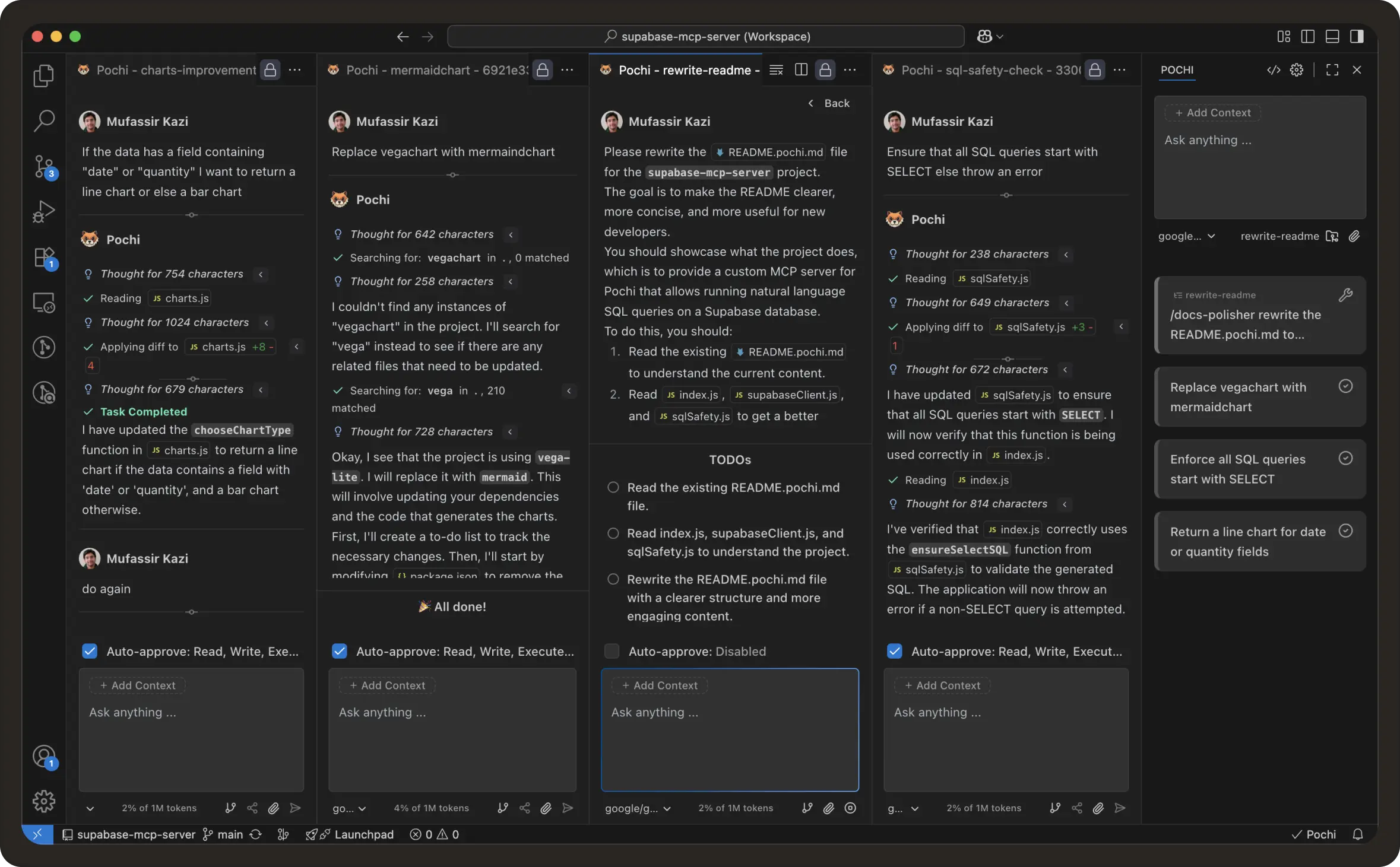
A great example would be to run the same task with different models to pick the best response. Won’t that be a faster and much better experience - all within the same timeframe?
This is different from other existing solutions, which operate inside a single editor tab. In those tools, you’re effectively working in one tab at a time: switching tasks means switching the state of the same working directory and the same conversation.
On the other hand, Parallel Agents in Pochi keep tasks fully isolated by running each one in its own Git worktree. You can keep multiple tasks active at once and switch between them without stashing or losing context.
How to use?
When to use Parallel Agents
Parallel Agents are most useful when you want to avoid breaking focus on ongoing work: quick bugfixes during feature development, long-running refactors that you want to keep separate, documentation changes that happen alongside coding, or letting an AI assistant explore broader changes in a sandbox.
On the other hand, if a change is meant to be reviewed and merged as a single unit, keeping it on one branch remains simpler.
Here is the demo showing the feature in action:
Read the full documentation here.
Weekly Update #9
TL;DR
Custom Agent gets even better ⚡ + i18n upgrades for global users 🌏! And major Chat Sidebar UX upgrades are coming soon! 🚀
🚀 Features
This change unifies how agents and workflows are invoked, creating a more intuitive and consistent experience for interacting with Pochi’s capabilities.
✨ Preview
We’re actively working on a series of UX improvements to the VS Code chat sidebar, aimed at making Pochi more seamless and intuitive to use.
Stay tuned for the upcoming update!
Weekly Update #8
TL;DR
We’ve given Pochi new tricks.
Workflows can now execute Bash commands, readFile tool handles multimedia inputs, and markdown rendering is faster and cleaner with streamdown.ai.
Let’s get on with it!
🚀 Features
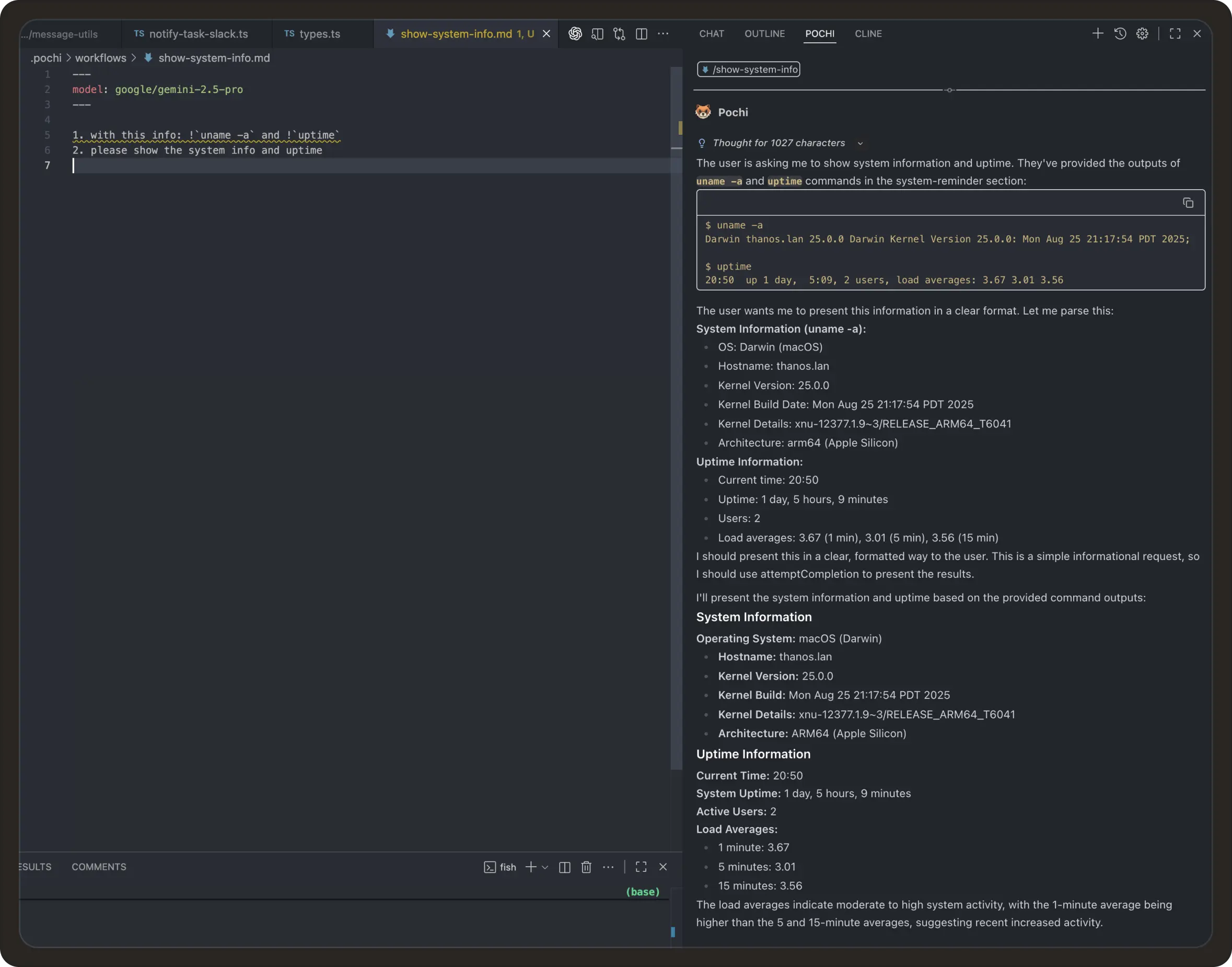
Pochi automatically runs these commands and includes their outputs in the model’s context, making workflows more dynamic and connected to your local environment. #541
✨ Enhancements
Faster Markdown Rendering with streamdown.ai: We’ve replaced react-markdown with streamdown.ai in the VS Code web UI. This upgrade improves performance, adds streaming-based markdown rendering, and ensures better support for rich content (like math, code blocks, and workflows). #401
Extended Multimedia Support in readFile Tool: The readFile tool now supports reading multimedia files, including images, audio, and video, for multimodal models. Pochi automatically detects file types and encodes the content in base64 for models that can interpret visual and auditory data. #539, #569
Weekly Update #7
TL;DR
This week, we focused on making Pochi more capable for builders who live in the terminal. We extended image-prompt support to the CLI, added global workflows for shared automations, and made the command-line experience smoother with shell autocompletion.
We’ve also shipped .pochiignore support and small but delightful touches like copying images directly from the extension chat.
🚀 Features
Global Workflows: You can now store workflows globally in ~/.pochi/workflows, and Pochi will load them across all workspaces. Easily share automations, setups, or linting rules, while allowing your team to maintain consistent review or deployment routines.#123, #517
Image Prompts in CLI: You can pass images directly to Pochi from the CLI, be it a diagram, a UI screenshot, or a flow chart. Models interpret and respond to your visuals, explaining issues, parsing charts and generating code based on UI mockups. #513
✨ Enhancements
🐛 Bug fixes
Weekly Update #6
TL;DR
Q4 is here, and Pochi’s cooking. 🍳
We’ve rolled out new built-in tools (webFetch and webSearch) that extend Pochi’s server-side capabilities, added support for new AI vendors (Codex and Qwen Coder), and released a new tutorial that shows how Pochi can act as your AI teammate in GitHub Actions.
Let’s start! 🧡
🚀 Features
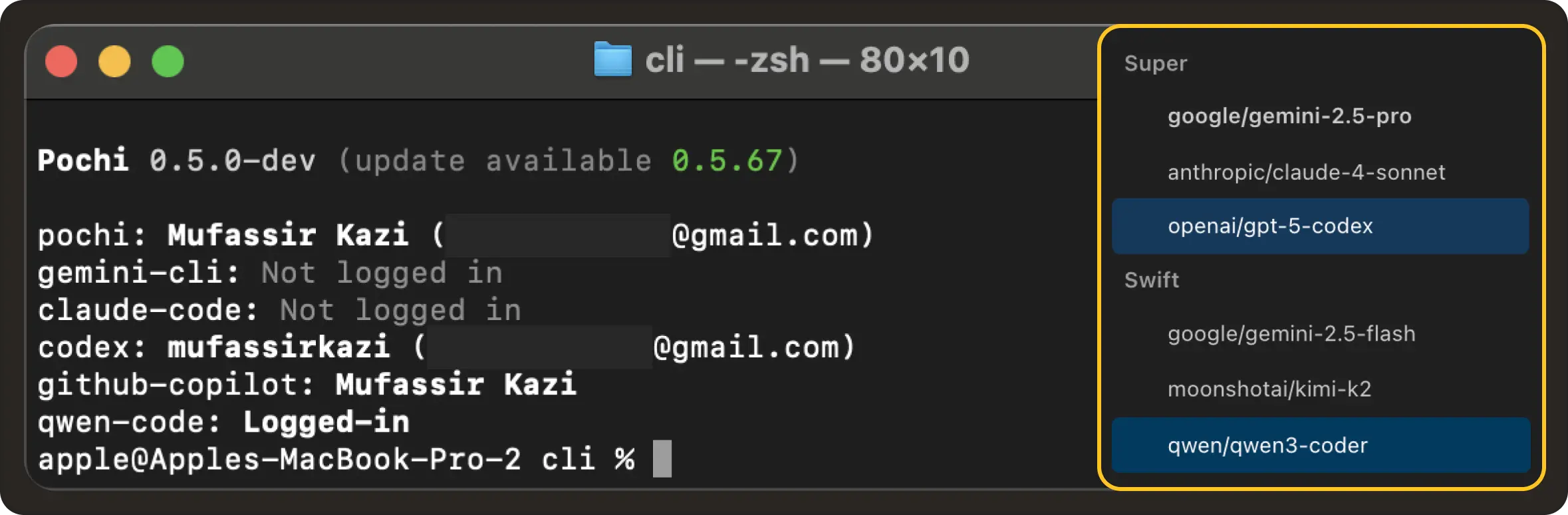
New AI Vendor Support: Pochi now supports Qwen Coder and Codex, adding new model vendors alongside Claude, Gemini, and Copilot. We've also introduced native compatibility with Anthropic’s API format, enabling faster and more stable integration with Claude models. #52, #304, #302
✨ Enhancements
🐛 Bug fixes
Assistant Retry Logic: Fixed an issue where assistant messages without tool calls were treated as new steps instead of retries, causing the retry count logic to behave incorrectly. #342
Diff View in VS Code: Files open before a diff operation are now reopened after accepting or rejecting changes, preserving your workspace layout. #440
📖 Resources
Weekly Update #5
TL;DR
This release introduces a manual sub-task execution mode for more control over sensitive workflows. We’ve also added MCP support in the CLI, enabled GitHub Copilot and Claude Pro/Max authentication, and shipped new tutorials and key security and stability improvements. 🙌
🚀 Features
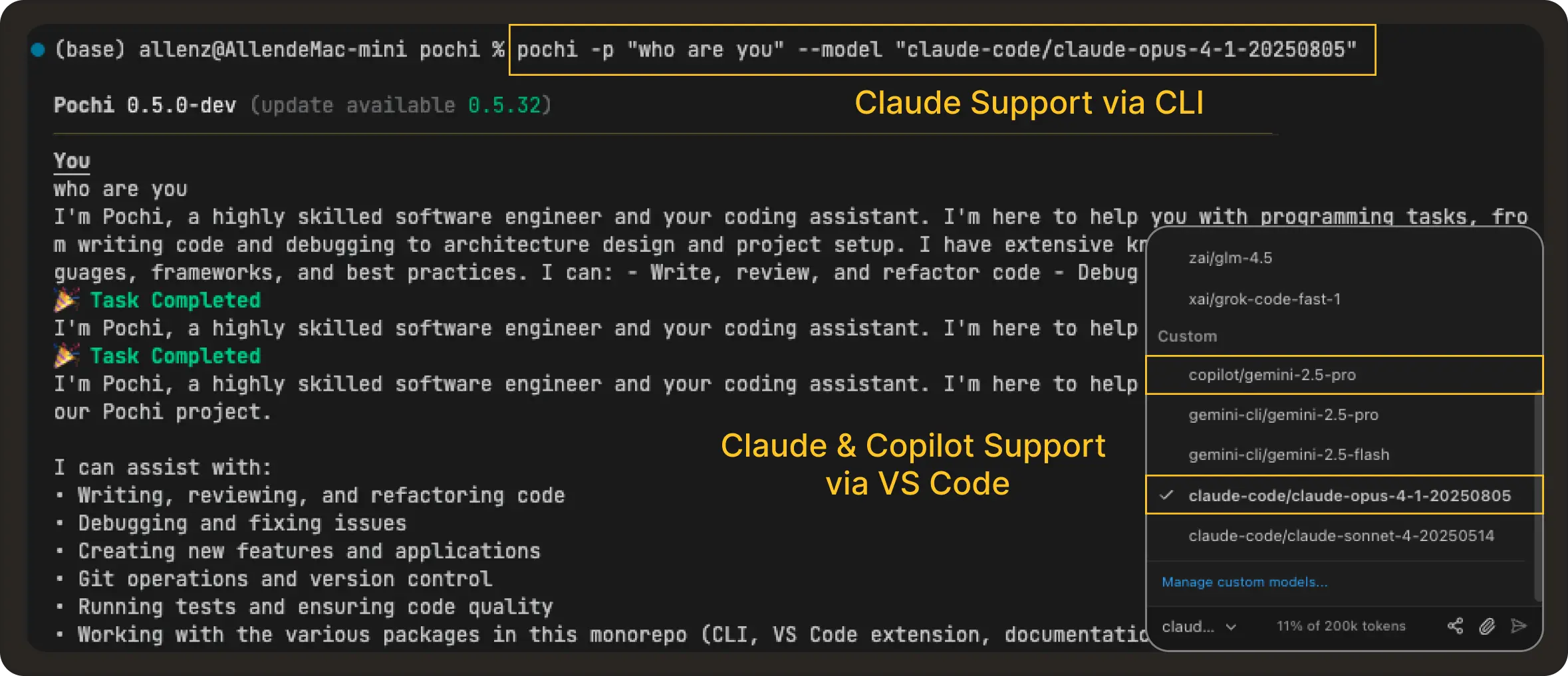
AI Tooling Integrations (GitHub Copilot + Claude): You can now authenticate and use your GitHub Copilot and existing Claude Pro/Max subscriptions within Pochi across both the CLI and VS Code. Once authenticated, these services provide completions and suggestions directly in your workflows, enhancing the overall AI-assisted development experience. #184 , #61, #306
Improved VS Code Configuration Navigation: VS Code commands like Pochi: Open MCP Server Settings now open the relevant config file and jump directly to the specific setting, #301
✨ Enhancements
Enhanced Gemini Model Support: We've improved existing image input capabilities with added PDF and video inputs, providing richer multimodal workflows with Gemini models. #219
Malformed Custom Agents in VSCode Settings: Previously ignored malformed agent files (e.g., with YAML parsing errors) are now displayed in the settings UI with a clear warning, making it easier to debug and fix broken custom agent configurations. #391, #415
📖 Resources
Weekly Update #4
TL;DR
We are excited to introduce Queued Messages — type prompts in advance and stop waiting for Pochi to finish a task! We also launched a new Tutorials section with guides on voice-driven development and Mermaid graphs. Have tips or insights? Contribute your own via PRs! Plus, Pochi now supports more file types, and the CLI is friendlier and more interactive. ✨
Features 🚀
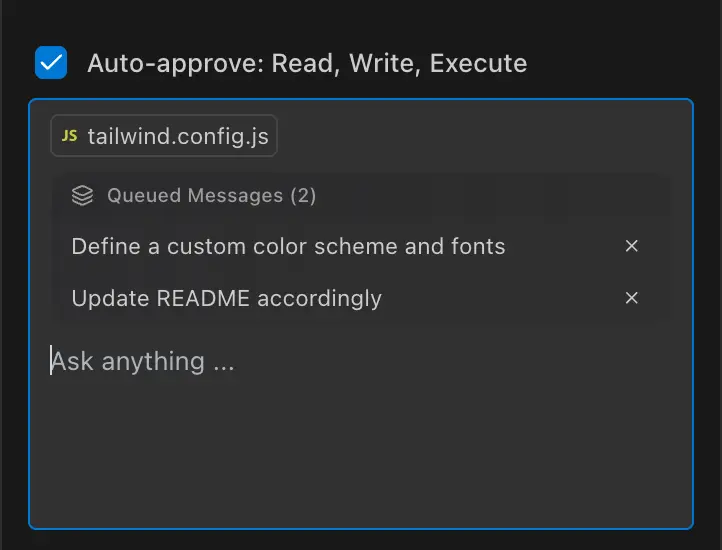
Queued Messages: Don't wait around — ⌘/Ctrl + ↵ to line up your next prompt when Pochi is busy. #286
Tutorials: A new documentation hub to help you get more out of Pochi. This week: voice-driven dev with Hex, and Mermaid graph communication.
Enhancements ✨
Multimedia file support: Share not just images, but also PDFs and videos with Pochi. #271
Claude Code login: The CLI now supports authentication with Claude Code. #282
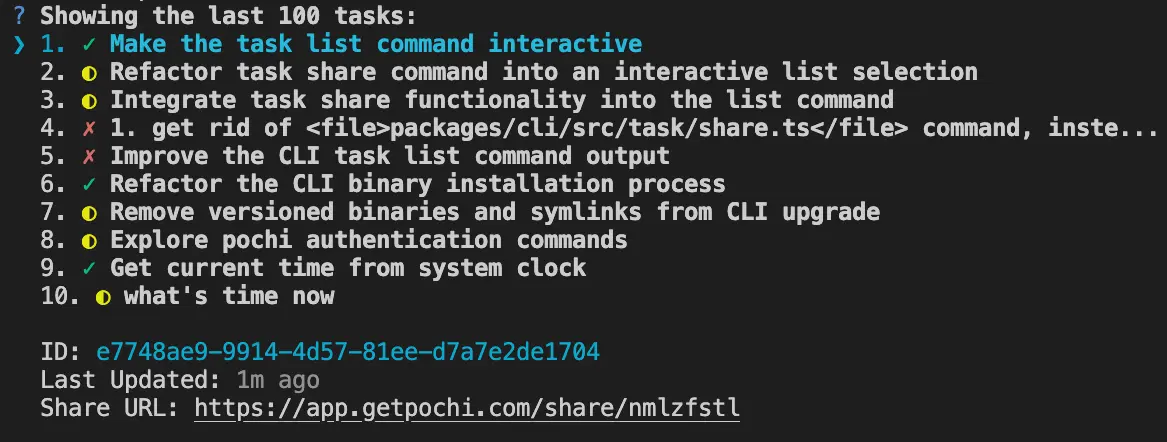
Friendlier CLI experience: Interactively pick auth vendors and navigate through tasks, get clearer help/error messages, and see upgrade notices on startup. #287, #294, #308, #329, #357
Docs updates: Added documentation for queued messages and tab completion model settings and improved VS Code docs. #317, #321, #365
Bug fixes 🐛
New Contributors 🐾
A belated shout-out to @DESU-CLUB for their first contribution last week — and another one this week! 🥳
Weekly Update #3
TL;DR
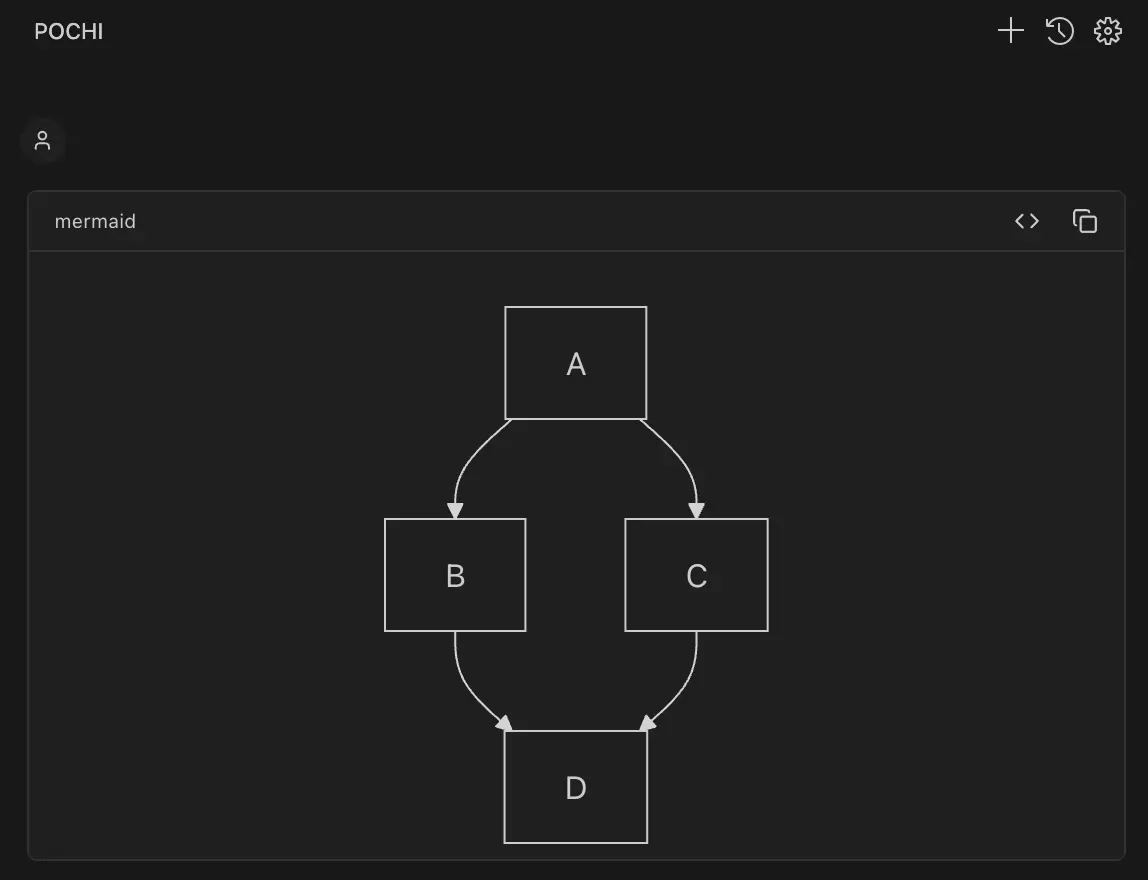
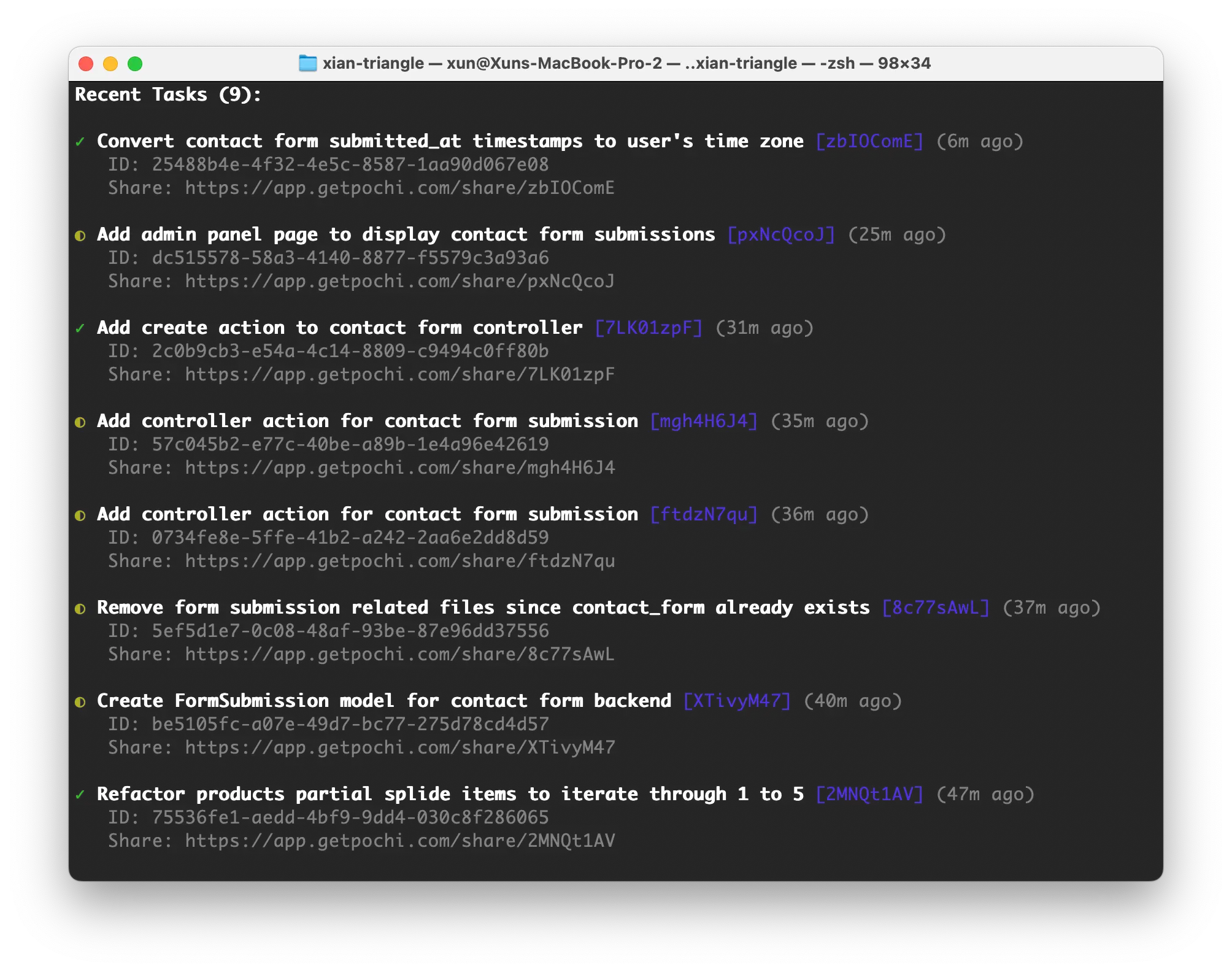
This week we brought custom agents to life!🐣 Pochi CLI is on npm, newTask makes it simple to create and manage tasks right from the terminal, and Mermaid diagrams render beautifully inside the app. MCP interactions are smarter too, and the docs and UI keep getting smoother with every update. ✨
Features 🚀
Enhancements ✨
Bug fixes 🐛
Weekly Update #2
TL;DR
We had a massive week — 62 PRs shipped 🎉!
Pochi can now reply to you right in GitHub comments & issues, the interface speaks more languages with new i18n support, and we rolled out a sleeker, more powerful background job system. On top of that, the CLI got smarter, autocomplete got friendlier, and the docs got a glow-up!
Features 🚀
Enhancements ✨
Bug Fixes 🐛
New Contributors 🐾
@karim-coder made their first contribution this week! Welcome aboard! 🎉
Weekly Update #1
TL;DR
This week we polished the VS Code extension with some UX upgrades, open-sourced the Pochi CLI, and did a few rounds of codebase cleanup to make contributing easier and friendlier for newcomers. We look forward to your first visit to the repo!
Enhancements ✨
Bug Fixes 🐛
Custom Agent
Learn how to create and use custom agents in Pochi.
Tutorials
Next Page
On this page
相關文章
其他收藏 · 0